CIOs get temporary relief as US court blocks $100,000 H-1B fee – Computerworld

CIOs get temporary relief as US court blocks $100,000 H-1B fee

A US federal judge has ruled that the Trump administration’s $100,000 fee on new H-1B visa petitions was unlawful, giving technology companies temporary relief from a policy that threatened to raise the cost of hiring foreign skilled workers.

The decision removes, at least for now, a major cost burden for employers that use the H-1B program to fill roles in domains including software development, cloud computing, data science, and AI.

US District Judge Leo Sorokin in Boston found that the fee functioned as a tax that the administration did not have authority to impose without congressional approval. The ruling came in a lawsuit brought by 20 Democratic state attorneys general challenging the fee.

Standard employer costs for H-1B petitions typically range from about $2,000 to $5,000, making the proposed $100,000 payment a sharp increase for companies seeking foreign talent.

The ruling is unlikely to end uncertainty for employers, with the Trump administration expected to appeal. But it could allow companies that had paused international hiring plans to resume normal recruitment for the upcoming H-1B cycle, said Pareekh Jain, CEO of Pareekh Consulting. Still, he said, employers should remain cautious because the legal and policy concerns are likely to continue.

“This provides breathing room for CIOs, even though it’s temporary,” said Neil Shah, vice president for research and partner at Counterpoint Research. “They should make the necessary contingency plans, whether that means doing more with less by leveraging AI or relying more on local talent.”

How companies may rethink hiring

If higher H-1B costs return in another form, CIOs will have to be more selective about sponsorship, weighing the added cost against the strategic value of the role and the long-term potential of the employee, Shah said.

“Ultimately, the decision comes down to business unit P&L: whether the unit can absorb the cost of acquiring the talent for that role,” Shah added.

That uncertainty could also lead CIOs to compete for talent from other companies, potentially driving up salaries for skilled workers. Some CIOs may conclude that paying a one-time $100,000 fee, amortized over the employee’s tenure, is still more cost-effective than engaging in a bidding war for scarce local talent.

Danish Faruqui, CEO of Fab Economics, said that CIOs may reserve H-1B sponsorship for a narrower set of mission-critical roles if costs increase.

“If there is such a financial burden, CIOs will justify sponsoring very specific roles,” Faruqui said. “These would be principal enterprise architects, AI, ML, and deep-tech researchers, senior product managers, and regulatory and compliance experts.”

More routine or project-based roles are likely to be treated differently, Faruqui said.

“Junior to mid-level software engineers, entry-level business analysts, and entry-level data scientists would shift from H-1B to domestic hiring,” Faruqui said. “Cloud migration, DevOps, ERP, and CRM implementation could be done through contractors or consulting firms, while QA, product testing, tier-one help desk support, and legacy maintenance are roles that CIOs could prioritize for automation.”

Who would be most affected?

Startups, smaller companies, and enterprise IT departments would have faced the greatest pressure from the fee and stand to benefit most from the ruling, Jain said.

Large technology companies would have been better placed to absorb the $100,000 cost, he said. Meanwhile, companies with mature offshore delivery models may be less likely to increase their reliance on H-1B hiring.

The article originally appeared on CIO.

Trump’s new AI order — hallucinations aren’t just for LLMs

Years ago, right-wingers coined the phrase “Trump Derangement Syndrome” (TDS) to describe people who hate US President Donald J. Trump. (I think it better describes the president’s outlandish, truth-challenged statements and the followers who think he can do no wrong.) What’s really deranged is his recent AI executive order.

First, a little history. As you may recall, Trump often (and loudly) trashed his predecessor’s Executive Order 14110, which had demanded “safe, secure, and trustworthy” AI. That Biden Administration order was replaced last year by Trump’s own “Removing Barriers to American Leadership in Artificial Intelligence” directive; it basically let US AI companies do whatever they wanted in the name of innovation.

Then, a little thing called Anthropic Mythos came along — and scared the pants off even AI’s biggest fans. Seemingly in response, someone in the federal government decided that letting AI companies do whatever they want might not be the brightest policy. 

Or, did they?

True, the new order creates a process under which AI companies can give US  government access to “covered frontier models” for up to 30 days before public release so experts can probe for vulnerabilities and test how the systems could be abused. It also directs agencies to set evaluation standards, establish an “AI cybersecurity clearinghouse,” and harden federal networks against rapidly advancing AI‑enabled attacks. 

Some people, like Graham Brookie, vice president for technology programs and strategy at the Atlantic Council, think the order is great. “The administration’s executive order on Advanced AI Innovation and Security is a serious policy with support from necessary stakeholders across party lines and industry to ensure the government is evaluating the cybersecurity risks posed by frontier AI models. It’s a policy that can be built on.

Really? I’m not sure Brookie read the same document I did — if, indeed, he read it at all.

I quote:

“Nothing in this section shall be construed to authorize the creation of a mandatory governmental licensing, preclearance, or permitting requirement for the development, publication, release, or distribution of new AI models, including frontier models.

“In addition, ‘This order is not intended to, and does not, create any right or benefit, substantive or procedural, enforceable at law or in equity by any party against the United States, its departments, agencies, or entities, its officers, employees, or agents, or any other person.’”

In other words, AI companies won’t be required to do much of anything. And if they do  submit a project for review, get the government’s blessing for it, and something goes badly wrong, it’s not the government’s fault. 

So, exactly why would AI companies even mess with this performative AI security theater?

Beyond those concerns, who exactly will be judging AI projects in 30 days? In theory, it would be a cybersecurity clearinghouse made up of people from the National Security Agency, the US Treasury Department, and the Cybersecurity and Infrastructure Security Agency (CISA). Most likely, CISA would do the bulk of the heavy-lifting — it’s their job, after all. But there’s this wee problem; Trump’s so-called Department of Government Efficiency (DOGE) last year gutted CISA. There’s virtually no one left to do the work, and certainly not in 30 days.

There’s also the question of funding for the new initiative.  According to the order, “The Director of OMB, in coordination with the National Cyber Director and the Director of CISA, shall determine whether any Federal grant programs have available and relevant funding that can be directed toward applicants developing advanced AI vulnerability detection.”

Spoiler: There’s no money set aside for this purpose.

Leaving aside whether the Executive Order has any teeth at all — the Brennan Center for Justice argued that under the Constitution, it doesn’t; the closer you look at the document, the less substance you’ll find.

Besides, in an industry where success is all about releasing the latest Large Language Model (LLM) as fast as possible to garner attention and investor dollars, who exactly would want to put their AI models on ice for even 30 days? (Short answer: No one.) These companies are always going to be focused first on getting the word out about their latest model as fast as humanly — Uh, AI-ly — possible. 

Still, some people seem to think this executive order really will make a difference. For example, Paul Benda, the American Bankers Association executive vice president for risk, fraud, and cybersecurity, sees it “as a constructive step toward strengthening the nation’s approach to managing the cybersecurity risks and opportunities associated with advanced artificial intelligence [because it ] can help better protect critical infrastructure, including the financial sector.”

Oh, please. I’m so tired of people who skim the titles of Trump’s executive orders and then assume there’s anything real about them. 

This AI order is meaningless garbage, and anyone telling you otherwise is either lying or wants to be on the Trump regime’s good (?) side. Or, both — it could always be both. 

WWDC: Did Apple make the AI grade this year?

There were several key components to emerge from Apple’s developer conference Monday as the company sought to reassure users (and investors) that it has met the existential challenge represented by AI. Aside from a serious focus on Siri AI and embedded Apple Intelligence across its varied platforms, officials also hailed a slew of performance/usability tweaks, described new child safety tools, gave macOS 27 a real name, “Golden Gate” — and offered a standing ovation in farewell to outgoing CEO Tim Cook.

Before the Worldwide Developer Conference (WWDC), analysts seemed optimistic about the company’s plans, most of which had already leaked. Analysts didn’t expect Apple to announce anything that would transform the AI industry (it didn’t), but they did hope the company would introduce tools to keep it competitive with rivals (it did). That’s assuming all the demos at the event were live, actual feature demos, rather than faked set-ups as seen before.

Hard, hard work

Apple’s teams have evidently worked incredibly hard to come this far, and execs did introduce truly impressive new AI features focused on what customers and developers actually need. The company also played to its strengths, particularly around vision intelligence; private-by-design (large language models) LLMs; highly useful contextual awareness; and Siri AI, which works as an app and lets you carry on conversational quests securely across all your Apple devices.

As anticipated, Apple also introduced APIs developers will be able to use to provide new AI features in their apps.

Among the many individual tools most of us can expect to use this fall, are:

  • Siri AI, which can help users search for information across their messages, emails, photos, and more; answer questions about virtually any topic; and take action in apps. 
  • Apple Passwords, which now automatically fix weak and compromised passwords with agentic AI.
  • Spatial reframing, which lets users recompose a photo after it’s been taken by dragging to shift perspective, as if repositioning the camera in the original scene.
  • A new Extend Tool, which expands the edges of an image to add breathing room, fix a crooked horizon, or change aspect ratio without losing the original subject.
  • A Notify Me tool that monitors web pages for changes such as price drops or restocks and sends a notification when something changes.
  • Photorealistic image generation, which supports the creation of high-quality photo-realistic images via a new generative model running on Private Cloud Compute.
  • One-tap contextual suggestions in Messages, which surface actions such as creating reminders and notes, or finding relevant photos based on conversation context.
  • And Describe a Shortcut, which means users can describe an automation they want in plain language and Shortcuts assembles the required steps automatically.

All about you, not AI

Apple did not seek to introduce AI features for their own sake; instead, it remains deeply focused on how to make its devices more useful to customers. As Craig Federighi, Apple’s senior vice president of software engineering, said: 

“Truly helpful AI must be centered on our users’ needs, deeply integrated into the products they rely on every day, grounded in personal context, and built with privacy at every step. That is our vision for Apple Intelligence. With useful features for browsing the web, expressing creativity, editing photos, and so much more, today marks a big step forward on our journey to integrate powerful AI into the core of our platforms and make our products even more personal and useful.”

Apple is not Gemini

Apple confirmed that it worked with Google Gemini to create some of the AI models highlighted today. This led some analysts before the event to say: “For Apple, the bull case is that a working Siri reframes it as an AI winner; the bear case is that paying a rival for core intelligence caps the premium investors assign to the stock.”

Perhaps they need not worry, as what we now seem to have is a far more solid base from which to continue to develop AI services and tools that compete against others in the space. Not only that, but Apple is not using rebranded Gemini — it simply worked with Google to build its own models, as Federighi insisted. In meetings at the show, Apple explained the full extent of the work it did with Google, stressing that none of the new features should be considered white label versions of Google’s LLMs. 

(Even Apple’s new search tools are based on its own search database, rather than anybody else’s. And when advanced searches are shared with Google-hosted Nvidia processors, Apple puts privacy protection in place.)

In the end, the most important consideration — for customers and developers — is that Apple seems to have succeeded in bringing dozens and dozens of powerful new on-device AI tools to its customers, giving it a firmer, more impressive peer position in the business. (It’s also true that investors were disappointed that the new AI features won’t be made available in Europe or China due to regulatory challenges, putting developers in both nations at a disadvantage.) Developers elsewhere will be able to explore Apple’s Foundation Models and its new Core AI APIs to their heart’s content. 

First reactions to Apple’s news

While Apple’s stock value dipped as investors sold on the news and invested into the speculation, I do think Apple successfully turned this corner — though it will need to continue to invest heavily in AI across its platforms. The work is far from over.

“It is great to see Apple continue to pursue a vision of AI that leverages local systems, preserves privacy, and integrates with third party tools,” Ken Case, CEO of the Omni Group, told me. “A lot of our work around the Apple Foundation Models and automation, App Intents, and adopting Swift look to be fruitful investments, but it’s clear there’s more to do starting this summer.”

Creative Strategies President and Principal Analyst Carolina Milanesi explained why it matters Apple is deploying these capabilities across its ecosystem, as it gives the company a unique market position. “Where Apple Intelligence is today is different than what Claude or ChatGPT are because is it really embedded in the devices, and we need to remember that Apple sells devices,” she said.

Apple did also note that the new Siri AI will be available in beta this year. “Investors wanted it in September. That means the real version is likely early to mid 2027,” said Gene Munster at Deepwater Asset Management. “Funny that the stock actually ticked up 0.5% on the “beta later this year” update given [that] while it’s later than what they wanted, it is at least a date that investors can focus on.”

It is also true that what Apple did achieve this year at WWDC is to offer up a set of new AI features that investors already see as having significant value.

You can follow me on social media! Join me on BlueSky,  LinkedInMastodon and The Core.

Minimus Unveils New Supply Chain Protection Proxy and Command-Line Interface for Container Management

Cloud software security firm Minimus today expanded its product portfolio with the general availability of Minimus Supply Chain Protection and minicli. The tools introduce a unified approach to managing third-party software risks and container image configurations.

The release of Supply Chain Protection directly targets vulnerabilities found within the application package universe, where interwoven dependencies are frequently maintained by isolated third parties. Operating seamlessly as a pull-through proxy for NPM and PyPI, the solution evaluates public packages based on popularity, commit data, and cooling-off periods before they reach CI/CD pipelines. Platform teams can deploy multiple configurations tailored to the risk tolerances of different development environments.

In tandem, Minimus has launched minicli, a public command-line tool downloadable for macOS and Linux (AMD and ARM). The utility allows developers to inspect custom image structures—including internal file bundles and environment variables—and manage private images directly from the terminal. By converting image recipes into YAML files, teams can easily integrate change controls and automation into their existing technology stacks.

Together with Minimus Images, which eliminate up to 98% of standard container base image vulnerabilities, these updates offer an end-to-end strategy for securing both OS packages and application dependencies.

About Minimus

Minimus delivers a modern foundation for secure container software, open-source dependency management, and software supply chain security. The company was founded in October 2022 by container security pioneers Ben Bernstein, Dima Stopel, and John Morello (co-authors of NIST SP 800-190 and founders of Twistlock) to solve the ongoing operational burden of cloud vulnerability remediation. By engineering high-security container images directly from upstream project sources with only the absolute minimum software required to run, Minimus completely neutralizes 98% of typical cloud software vulnerabilities. Minimus offers a highly scalable, developer-friendly solution that deploys instantly via standard tools, and is backed by a $51M seed investment from YL Ventures and Mayfield. 

WWDC: Apple’s AI moment of truth arrives

Everybody is watching to see what comes from Apple at its annual Worldwide Developer Conference (WWDC) today. There’s a great deal at stake, as when it comes to artificial intelligence (AI) today’s event represents an existentially important moment for the company. 

Apple execs absolutely must convince developers, industry watchers, users — all of us — that it has learned from its well-publicized mistakes of the past two years and put together a serious proposition for AI across its platforms.

What we think we know

Right now, we think Apple intends to offer a hybrid of its own self-developed AI tools and services combined with others made with Google Gemini — all supported by an open approach to using AI services from third-party providers such as Anthropic or OpenAI. 

When it comes to implementation, this should mean a contextually sensitive Siri that can respond to what you have on the screen of your device, or in the viewfinder of your camera app. The idea here is that you’ll be able to do contextual tasks like book restaurants or send a message to your granny, translate a sign, or even navigate around a room. More than this, you should also be able to combine tasks giving Siri complex — agentic AI — tasks it can then transact on your behalf.

Many of these functions will take place on device. Some will rely on Apple’s own fleet of Private Cloud Compute servers, supported by additional capacity from Google and Nvidia. When Apple Intelligence/Google Gemini can’t accomplish a task, you’ll be able to request that another service handle it on your behalf outside Apple’s managed garden. Siri itself will also gain a brand new interface.

What developers expect and how we got here

As discussed here, developers expect Apple will make access to many of its new Apple Intelligence APIs available to them.  This will let them deploy useful functionality in their apps at no charge, in part because the intelligence takes place on the device. 

It will also be possible for developers to permit their apps to run without being opened, which means a user should be able to ask Siri to do complex tasks that also include functionality from their apps. During this past weekend, we were warned that some or all of the new Siri functionality might be introduced on a staggered basis using a waiting list.

Apple has come a long way since that tense meeting in early 2025 when the company’s senior leadership established a new approach to AI. With Apple CEO Tim Cook taking an uncharacteristic interest in driving his teams to pull their act together, Apple developed a new, partnership-based approach to try to recapture lost ground.

Has Apple achieved it? That’s the test

Has Apple finally regained the initiative?

To a great extent, that will be the big focus across the industry once the company tells us what it’s done. Cook’s final WWDC as CEO sees a company at the absolute top of its game in so many ways, including soaring Mac sales. But to some extent he will be judged on how successfully Apple’s AI pivot comes across.

Weekend analyst notes summed it up, with bears and bulls tossing insights along. In one camp, you’ll find the true believers who argue that if Apple does come to us with something convincing, it has a chance to absolutely dominate consumer AI. “Siri/Apple Intelligence 2.0 has the potential to become the ultimate AI resource offload and deliver a form of Agentic AI to the consumer at a lower cost than incumbents,” said Morgan Stanley analyst Eric Woodring.

Cynics, however, warn that Apple really must demonstrate the kind of contextual, agentic AI it first announced (and failed to ship) two years ago; they want a chatbot with muscle, and will see right through any attempt to place a PR veneer over something weaker than what others already provide. If Apple fails to deliver on this, it can expect its stock to be utterly savaged over the next few days, though some analysts believe that Apple’s previous missteps mean the damage is already priced in.

A chance to shine, but can it?

Ultimately, of course, in addition to convincing industry watchers, Apple will need to find a way to deliver the kind of AI power consumers have been told to expect — while also protecting privacy. If it does get that right, particularly if it truly exploits its powerful hardware to ensure the most common tasks take place directly on the device, it has a major opportunity to deliver a form of Agentic AI at a lower cost than incumbents can. And it can do so while leaving the core AI bubble to burst as and when it will.

Will Apple succeed? We’ll know in a few hours, when you should check back for first takeaways on what Apple has to share. Join me on the Core for the headline summaries.

You can follow me on social media! Join me on BlueSky,  LinkedInMastodon and The Core.

EU’s cloud sovereignty push leaves room for US hyperscalers

The European Commission published its tech sovereignty package last week, including the clearest signal yet of its intention to strengthen European cloud sovereignty and reduce its dependence on US hyperscalers.

It’s a response to growing concerns among European organizations and regulators about the reliance on US tech firms and legislation such as the US CLOUD Act, which could give US officials access to data — even if it is stored in Europe.

But any shift toward local, sovereign cloud providers will necessarily be gradual, analysts, said as the Cloud and AI Development Act (CADA) proposals leave plenty of room for US providers to continue supplying cloud computing services to European public sector customers.

“The direction is right. The execution will be slow,” said Fernando Pereiro, senior director analyst at Gartner.

While the Commission has correctly identified areas where the EU is most dependent on foreign providers, delivering on its ambitions is another challenge, he said. Scaling alternatives to US suppliers “takes time, capital, and coordination at a level that is difficult to sustain in Europe.”

Dario Maisto, senior analyst at Forrester, played down the prospect of a major short-term shift towards European cloud providers as a result of the CADA proposals, even after recent interest in local European vendors for mission-critical workloads and highly sensitive data.

“I do not expect an immediate impact on the cloud infrastructure market,” Maisto said. “Full-blown migrations are costly and take several years. They are not going to happen in the near future.”

Instead, Pereiro expects the gradual emergence of “sovereign enclaves” or controlled environments for sensitive workloads, particularly in government and regulated sectors. “Outside of those areas, the market will remain global, but increasingly shaped by European rules,” he said.

Nevertheless, the three US hyperscalers that account for around 70% of the European cloud market – Amazon Web Services (AWS), Google, and Microsoft —  will likely see a more competitive environment.

“The real shift is symbolic and structural: hyperscalers move from being the default choice to one option among others, and their competitiveness will increasingly depend on how well they align with European control requirements, not just on technology or price,” said Pereiro.

What is CADA and what could it mean for Europe’s cloud market? 

CADA is part of a range of policy and legislative proposals — known as the Tech Sovereignty Package — published by the Commission, alongside Chips Act 2.0, the Open Source Strategy, and Strategic Roadmap for Digitalization and AI in Energy.

CADA includes measures to boost European tech sovereignty. Among other things, it aims to triple data center capacity in the next five to seven years by easing restrictions on new infrastructure projects across the EU, as well as efforts to support research and development of cloud and AI technologies.

It also includes a sovereignty framework that, if enacted, would require EU public bodies to assess sovereignty risks and procure cloud services that meet four assurance levels.

The various levels portray “a political vision with many open questions,” said Maisto. In more detail:

  • Level 1 requirements are achievable by hyperscalers, Maisto said, with requirements focused mostly on data residency. 
  • Level 2 is “more controversial,” he said, as it includes requirements around third-country access to data and disruption of services.
  • Level 3 leaves room for US providers to win procurement contracts — particularly where they enter a joint venture with a European cloud provider such as S3NS, a Thales subsidiary that has partnered with Google.
  • Level 4 applies to only a small proportion (1%) of the most sensitive workloads.

The first two levels could be open to US hyperscalers, said Maisto, with 70% of existing EU public sector workloads falling under Level 1 and 20% at Level 2, according to Commission’s own impact assessment. Just 9% of the workloads would require Level 3. 

The most stringent Level 4 would require cloud providers that “have full transparency and control over their software supply chain and no interference from a third country,” the Commission said.

For public sector organizations, the CADA rules could create more clarity around procurement, said Pereiro. “Today, the concept of ‘sovereign cloud’ is often vague and inconsistently applied in providers’ marketing and messaging,” he said. “This package standardizes what sovereignty must look like in practice, effectively ending the era of ‘sovereign washing.’”

The proposals give public sector organizations a “stronger set of requirements with which to assess risk, especially around jurisdiction and access to data,” he said.

“For enterprises, it’s less about regulation and more about leverage,” said Pereiro. “They gain clearer benchmarks and more viable alternatives, particularly through open source and emerging European providers.”

European cloud industry sees ‘a step in the right direction’

The Cloud Infrastructure Services Providers in Europe (CISPE) — a nonprofit trade group — welcomed the “strong definitions” of Levels 3 and 4, and said that, if implemented well, the proposed rules could “help to challenge the commercial dominance of established foreign cloud and AI vendors.”

However CISPE also called the current Level 1 and 2 criteria “confusing and non-sensical,” and said they should not be designated as “sovereign” since US hyperscalers can meet the requirements. “This will continue to confuse the market, both public and private customers, and encourage more sovereignty washing attempts,” CISPE said in a blog post Thursday.

CISPE also said the proposals fail to require public authorities to check whether a European service exists before opting for a foreign supplier. “We see a significant risk that assessments become a ‘rubber-stamp’ exercise that allow IT departments to continue to buy non-sovereign services out of convenience,” the organization said.

French firm OVHcloud — one of the leading European cloud computing and web hosting companies — welcomed the proposals, though it said any rules must be carefully scoped to ensure they are effective.

“This text is a step in the right direction and represents an opportunity to strengthen European strategic autonomy — something unthinkable just a few years ago,” an OVHcloud spokesperson said. “It provides a useful framework, but one that must not leave too much room for exceptions and workarounds. 

“Europe must and can move much faster, with very clear rules and a genuine European preference. Beyond this text, the Commission has demonstrated with its sovereign procurement call that it is possible to act right now to reduce critical dependencies. The time for waiting is over. We must accelerate. We must clarify. We must own it. 

“Europe has the players and the expertise,” the spokesperson said. “It is time to turn political ambition into European industrial capability.”

The overall tech sovereignty package “marks the overdue shift from diagnosis to treatment,” said a spokesperson at Ionos, a German cloud and hosting company. Ionos pointed to the EC’s claims that more than 80% of digital products, services and infrastructures in the EU originate from non-European providers, while 264 billion euros flow from EU organizations into predominantly US-based IT products.

“This is a strategic failure that must now be corrected,” the spokesperson said. While the company applauded the Commission’s focus on “secure and sovereign cloud and AI infrastructure for highly critical use cases,” it argued the CADA proposals fall short. “The central weakness of the package: the approach remains predominantly supply-side. The decisive lever — the demand side – is missing. Public procurement is the most powerful instrument for digital sovereignty. The public sector as anchor customer is critical for scaling sovereign cloud and AI solutions.

“Europe will remain dependent on Nvidia and AMD for GPU computing, the spokesperson said. “What matters is not whether to cooperate, but on what terms: data under European law, operations by European providers, no extraterritorial access. …If EU funding earmarked for ‘sovereign cloud’ ends up with the European subsidiaries of US hyperscalers, the package will have failed its objective.”

The real impact on hyperscalers

The proposed rules could require hyperscalers to change tactics to cater to European customers, or to at least ramp up existing sovereign cloud strategies. “For vendors, this is essentially a shift in what ‘competitive’ means,” said Pereiro. “For the last decade, scale and hyperscaler alignment were enough. That’s no longer the case.”

Cloud providers will need to demonstrate real control over data, infrastructure, and operations, he said, and not just label solutions as “sovereign.”

“The bar has been raised, and some existing offerings simply won’t clear it,” he said.

While the CADA rules are designed to favor European providers in some cases, the proposals stop short of barring US providers from public sector contracts. “It doesn’t shut them out,” said Pereiro, “but it changes competitive conditions substantially.”

The proposed procurement requirements make sovereignty a “gating factor” for sensitive workloads, said Pereiro, and “create real friction for providers whose operating models depend on centralized control or non-EU jurisdiction.”

US tech firms tout support

US hyperscalers publicly welcomed the proposals, and indicated plans to work with policy makers and ensure the importance of customer choice in cloud service procurement.

“We look forward to reviewing the proposed rules and continuing to work alongside our partners to ensure European organizations have the power of choice and sovereign control,” a Google spokesperson said.

An AWS spokesperson said the company has invested ”tens of billions of euros” in European cloud infrastructure, which it claims has “already advanced the continent’s competitiveness, helped organizations innovate and grow, and supported the development and resilience of both public and private services that Europeans now rely on every day.

“European organizations deserve access to the best technology available from trusted providers, chosen on the basis of security, performance, verifiable controls, and value,” the AWS spokesperson said. “We look forward to working with policymakers to ensure the Cloud and AI Development Act promotes technology choice and rewards long-term investment in Europe’s digital future.”

A Microsoft spokesperson said the company shares the EU’s “ambition to strengthen technological sovereignty and global competitiveness in AI, grounded in openness, partnership and fair competition.

“Achieving this will depend on access to world-class infrastructure and technologies at scale,” the Microsoft spokesperson said. “That means enabling European companies and public administrations to make procurement choices based on a broad, risk-based assessment in an open and competitive market.

“Microsoft offers secure and sovereign cloud solutions that put customers in control, and we stand ready to help build a strong, resilient and globally connected AI ecosystem in Europe.”

While the proposals present potential hurdles for US hyperscalers, those that adapt to the new regulatory direction — and concerns of European organizations — will benefit, said Pereiro. “If your offering aligns with sovereignty requirements, your company will be likely to see more opportunities, not fewer,” he said.

Tech industry cut 38,242 jobs in May, worst since 2024

Technology companies announced 38,242 job cuts in the US in May 2026, the highest monthly total for the sector since August 2024, according to research by employment placement company Challenger, Gray & Christmas. So far this year the company has observed 123,653 US technology job cuts, a rise of 66 percent from the same period in 2025.

These figures represent the third successive month that there has been an increase in job layoffs across all sectors, the company said.

“The labor market is being reshaped by technology in real time. AI is now the leading reason companies give for cutting jobs and the primary industry citing it is technology,” said Andy Challenger, chief revenue office at Challenger, Gray and Christmas.”

AI was blamed for 38,579 of the 97,006 job cuts announced across all industries tracked by the company. It accounted for 40% of the cuts observed in May, up from 7% in January.

This year has already seen some major layoffs in technology. In March, HPE slashed 2,500 jobs from its wage bill, while Oracle announced plans to shed an unspecified number of developers. And the cuts keep on coming, just last month, Meta shed 8,000 employees.

Why Apple may be winning again

As we lean into WWDC, three strategically brilliant Apple moves have been exposed in the last couple of weeks, two of which will have immense consequences in the coming year, while one sets the scene for essential future growth.

In each case, Apple’s leadership has found counter-intuitive gambits that actually secure the company’s future. Let’s start with Vision Pro.

It came from the future

News this week is that incoming CEO John Ternus has made some tough decisions around Apple’s approach to spatial computing, terminating development of Vision Pro (even as leaked images of a black model emerge) while focusing R&D on two smart glasses projects to compete with Meta. 

The intention is to introduce XR and AR glasses priced at around $300 to $500 each. While not as richly-featured as the Vision Pro, they will be within the reach of more people and draw deeply on the huge R&D effort that went into the original Apple AR visors. Apple hopes a focus on trust and privacy will be enough to push Meta aside, helping Cupertino dominate this part of the category. If that plan succeeds, don’t be at all surprised to see plans for Vision Pro 2 return to the table, though that’s not the focus now.

Apple frequently described the Vision Pro as a product “pulled from the future,” a device for enterprise users and early adopters. For many such users, the existing product will be useful in their work for time to come. 

What’s strategically solid about this is that Apple has now defined a good future for spatial computing and is bringing components of that future to the mass market on the basis of a provable technology you can already try for yourself in any Apple Store. This is a long game, and while it will take time to play out, it’s a game the company has proved it can join.

Privacy as a standard

Apple has apparently chosen to use Nvidia and Google technologies to support at least some of the Apple Intelligence/Siri improvements to be announced at WWDC next week. This seems to fly against the company’s general approach to privacy on its platforms, with the silicon, operating system and — thanks to Private Cloud Compute — the cloud all in its control.

How, you might ask, can Apple ensure privacy when using third-party infrastructure to manage some AI transactions? How can it do so without damaging its trusted brand?

One direction that makes sense is to consider that Apple and its partners have reached consensus on what privacy should be and how it should be delivered. That’s a very important consensus, as it suggests Apple is building an approach that makes privacy an attestable standard.

The company has been pushing governments for years to agree to such standards, but all it seems to have had in return are continued government attempts to erode personal privacy. That’s particularly evident in the UK government’s egregious move to undermine encryption to the detriment of all. (The UK isn’t really alone in preferring surveillance above liberty.)

Android developer Google has had the same experience, and while its approach to privacy differs from Apple, both companies understand the need for encryption. As such, any form of consensus on some form of privacy standards is welcome — and while I’d very much prefer an enforceable, verifiable approach, some industry agreement has to be better than nothing at all. 

While I don’t believe Apple’s approach to privacy in the new breed Siri/Apple Intelligence will be introduced in this way at WWDC, it will be interesting to see what does emerge from the new tech triptych (Apple, Google, Nvidia) in the coming months. Certainly, all three have a great interest in guarding encryption against Quantum attacks for which hidden backdoors would be easy pickings.

Winning the PC War

Apple has won the PC war.

That last point needs explanation: Apple’s entry-level MacBook Neo also has just 8GB RAM, but it also has custom-designed Apple processors and an operating system optimized to run on the hardware. That means those Macs use memory far more efficiently than their competitors

So, you can pick up some mass market Windows laptops for $800 that hold just 8GB memory, or spend $699 for a MacBook Neo with double amount and that can also run Windows in VM extremely well

Component prices are not going to shrink back for a while, any more than further magical thinking is going to end the war in Iran. At this point in the cycle, Apple has the PC market advantage. Millions are purchasing its entry-level Mac and the vast majority of those new users will love the platform, as new users usually do. That’s going to lead to a spike in Apple services sign-ups, and prompt solid future upgrade and accessory sales cycles.

Apple accomplished this by selling a low-cost Mac at a time when competitors face existential problems maintaining their grip on the mid-range market. The longer Apple holds prices on the device, the greater the advantage it builds, while applying huge pressure on PC competitors.

Summing up the goods

With the Mac hitting its iPod moment as it achieves mass market sales, Apple finally seeing something like progress in its attempt to secure privacy in a digital age, and a strong position from which to grow in the wearables market, the company has played a fine hand. 

That’s even before it introduces us to its improved Apple Intelligence, and an era of AI access in which many everyday tasks take place token free directly on the device. Indeed, when it comes to AI, if it gets things right at WWDC, Apple appears to be making money, while AI competitors are bleeding financial oxygen as their inflated bubble heads to its inevitable demise. What about the enterprise? Take a look at this chart.

You can follow me on social media! Join me on BlueSky,  LinkedInMastodon, and follow The Core.

Anthropic suggests slowing AI research until we can align it with human goals

AI could soon lead to systems capable of improving their own performance faster than humans can effectively supervise them, reviving concerns about the industry’s longstanding “alignment problem,” ensuring AI systems reliably pursue human goals, senior Anthropic researchers have warned in a new blog post titled “When AI builds itself.”

Anthropic Institute lead Marina Favaro and Anthropic co-founder Jack Clark outlined three possible futures: growth in AI capabilities may flatten out; AI efficiency gains may continue to grow, but expose bottlenecks elsewhere in software development; or AI systems may become capable of full recursive self-improvement, and build their successors by themselves. It’s that third scenario that’s prompting them to suggest society be ready to hit the brakes on AI development.

“How the alignment problem gets solved — or not — in this future is something we are least certain about,” they wrote. Advanced, self-improving models could follow our needs and wants — or, they warned, “The rare occurrences of misalignment present in today’s models could compound as the models build their successors, growing more frequent but less understood until we lose control of them. It’s possible that we can’t build, integrate, and verify the tools that we’d need to understand which trendline we are actually on.”

While Anthropic’s warning is framed around future AI development, analysts say it highlights governance questions enterprises are already beginning to confront as autonomous AI agents move from answering questions to taking actions.

“The issue is no longer just whether AI gives the right answer, but whether autonomous systems take the right action, at the right time, within the right authority,” said Ashish Banerjee, senior principal analyst at Gartner.

From model governance to agent governance

The warning comes amid growing enterprise investment in agentic AI.

Gartner predicts that by 2028, 15% of day-to-day work decisions will be made autonomously through agentic AI and that one-third of enterprise software applications will incorporate agentic AI capabilities. The firm has also warned that governance shortcomings are already emerging, predicting that 40% of enterprises will demote or decommission autonomous AI agents by 2027 after governance failures become apparent in production environments.

Banerjee said many organizations continue to approach AI agents as advanced productivity tools when they increasingly resemble digital workers operating with delegated authority.

“CIOs should stop treating AI agents as smarter chatbots,” he said. “They are becoming digital workers with delegated authority — and must be governed like privileged users, not productivity tools.”

As agents gain the ability to conduct research, write code, invoke tools, trigger workflows, and make recommendations, enterprises face new risks around unauthorized actions, accountability gaps, data exposure, tool misuse, and insufficient auditability, Banerjee said.

“Human-in-the-loop is not a strategy if the human cannot keep up with the loop,” he said.

Charlie Dai, vice president and principal analyst at Forrester, said Anthropic’s concerns mirror challenges enterprises are already encountering as AI systems gain greater autonomy.

“Alignment becomes operational,” Dai said. “It is about ensuring agents consistently act within policy, not just model accuracy.”

Current governance approaches focus largely on models and data, but increasingly autonomous agents require oversight of runtime behavior, permissions, tool usage, and decision boundaries, Dai said.

Concerns about agent oversight are not limited to AI vendors and industry analysts.

In AI Agent Governance: A Field Guide, researchers from Institute for AI Policy and Strategy warned that “society is largely unprepared for this development” and said “the exploration of agent governance questions and the development of associated interventions remain in their infancy.” The paper argues that advances in autonomous AI agents are outpacing the governance mechanisms needed to oversee them.

Both analysts argued that governance frameworks originally designed for generative AI models may prove insufficient for increasingly autonomous systems. Dai said organizations will need greater oversight of runtime behavior, permissions, tool usage, and decision boundaries as agents become more capable.

Why Anthropic is worried

Anthropic’s researchers argue that those governance questions could become significantly harder if AI systems become increasingly involved in the process of AI research and development itself.

Favaro and Clark stopped short of predicting that fully autonomous recursive self-improvement is inevitable. Instead, they argued that the possibility warrants preparation and discussion among developers, policymakers, and other stakeholders. They also suggested the industry may eventually need mechanisms to slow development if capabilities begin advancing faster than safeguards, while acknowledging that such measures carry risks of their own.

“But if a slowdown simply lets the least cautious actors catch up technologically, it could leave everyone less safe,” they wrote in the blog post.

Forrester’s Dai said the practical implication for enterprises is that governance can no longer depend primarily on human review.

“Supervision becomes architectural, not manual,” he said. Organizations will increasingly need bounded autonomy, embedded guardrails, verifiable execution mechanisms, and fallback controls designed into agentic systems from the outset.

16 ways to speed up Windows 11

Windows 11 does a lot under the hood to speed up a PC’s performance, but PCs tend to slow down over time as they accumulate apps, files, drivers, and other detritus. Even zippy new Windows 11 devices can be sped up — and protected against future slowdowns — with a few minor system tweaks.

It’s simple to make your Windows PC run faster. Just follow these tips.

Top ways to speed up Windows 11

  1. Disable programs that run on startup
  2. Turn off unused apps with high resource usage
  3. Use Efficiency mode
  4. Use automatic Windows maintenance
  5. Kill adware and bloatware
  6. Turn off search indexing
  7. Clean out your hard drive
  8. Disable shadows, animations, and visual effects
  9. Disable transparency
  10. Change your power settings
  11. Turn off Windows tips and tricks
  12. Disable Game Mode
  13. Update device drivers
  14. Turn off background app permissions
  15. Roll back your PC to a previous state
  16. Restart Windows

Read on for details.

Note: This story covers Windows 11 version 25H2. If you have an earlier release of Windows 11, some things may be slightly different. If you have Windows 10, see our Windows 10 speed tips.

1. Disable programs that run on startup

Your Windows 11 PC could be a laggard if programs you rarely or never use are running in the background. Your PC will run faster if you stop them from running.

To do it, first launch the Task Manager in one of these ways:

  • Press Ctrl-Shift-Esc.
  • Right-click the lower-right corner of your screen and select Task Manager.
  • Type task manager into the Windows 11 search box and press Enter.

There’s a lot you can use Task Manager for, but here we’re focusing only on killing unnecessary programs that run at startup.

Click the Startup apps icon on the left side of the screen. (It’s the fifth icon from the top.) It displays a list of the programs and services that launch when you start Windows. The list includes each program’s name as well as its publisher, whether it’s enabled to run on startup, and its “Startup impact,” which is how much it slows down Windows 11 when the system starts up. Note, though, that the screen doesn’t show how much each program will impact your performance after startup, during normal PC operations.
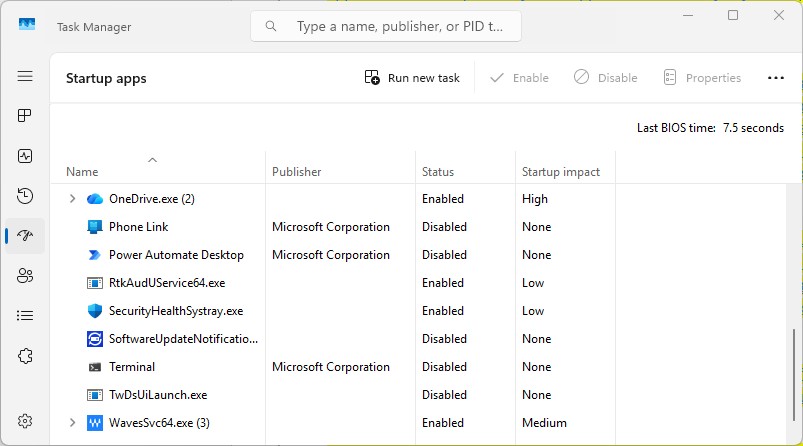
screenshot of task manager startup apps screen with list of apps that run at startup

You can use the Windows Task Manager to get information about programs that launch at startup and disable any you don’t need.

Preston Gralla / Foundry

Also note that not all apps will have useful information about their startup impact — many show up as “Not measured” in Task Manager. There are multiple reasons you might see this. For example, some apps don’t provide the Windows metadata required to measure their startup impact, and others start up too late in the boot process to be measured. Still others may not have been started a sufficient number of times for Windows to measure their impact. (The Windows Club has an article with tips and workarounds for “Not measured” apps.)

To stop a program or service from launching at startup, right-click it and select Disable. This doesn’t disable the program entirely; it only prevents it from launching at startup — you can run the application after launch. Also, if you later decide you want it to launch at startup, you can return to this area of the Task Manager, right-click the application and select Enable.

Many of the programs and services that run on startup may be familiar to you, like Microsoft OneDrive or Spotify. But you may not recognize many of them. (Anyone who immediately knows what “bzbui.exe” is, please raise your hand. No fair Googling it first.)

The Task Manager can find information about unfamiliar programs. Right-click an item and select Properties for more information about it, including its location on your hard disk, whether it has a digital signature, and other information such as the version number, the file size, and the last time it was modified. (Note that not all programs provide this information when you right-click them — the Properties button may be grayed out.)

You can also right-click the item and select Open file location. That opens File Explorer and takes it to the folder where the file is located, which may give you another clue about the program’s purpose.

Finally, and most helpfully, you can select Search online after you right-click. Bing will then launch with links to sites with information about the program or service. With Task Manager’s help, I easily discovered that bzbui.exe is Backblaze backup software, something I want to run automatically during startup.

If you’re worried about one of the listed applications, you can go to a site run by Reason Software called “Should I Block It?” and search for the file name. You’ll usually find very solid information about the program or service.

Now that you’ve selected all the programs that you want to disable at startup, the next time you restart your computer, the system won’t launch those unnecessary programs automatically, and your PC may run faster.

2. Turn off unused apps with high resource usage

It’s easy to forget just how many apps you’ve got running at the same time in Windows. Sometimes your PC’s sluggishness can be due to running too many apps you’re not currently using — or a single app that’s taking up a lot of resources.

First launch Task Manager using one of the methods covered in the previous tip. If you’re already in Task Manager, click the Processes icon on the left side of the screen (three squares in a grid, second from top) to get to the Processes screen. You’ll see a list of every app or process you’re currently running.

Look for apps you’re currently running but not actively using, and also look for any not running with high memory or CPU usage. Right-click any app you want to close and select End task.
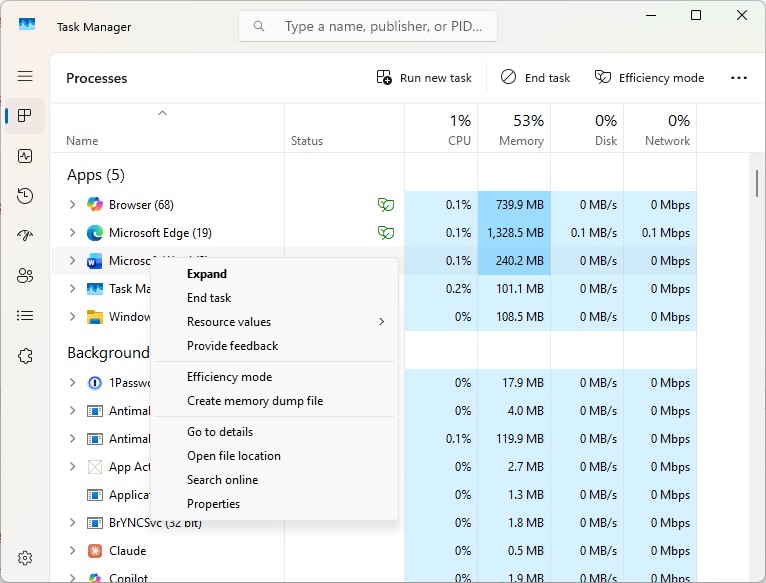
screenshot of task manager processes screen with list of processes and cpu and memory usage

Use Task Manager to identify and shut down unused apps using lots of system resources.

Preston Gralla / Foundry

3. Use Efficiency Mode

Task Manager has another trick up its sleeve for juicing Windows 11 performance. Efficiency Mode can speed up your PC and improve laptop battery life. It lowers the process priority of background applications, among other efficiency tricks.

The term is a bit of a misnomer, because you can’t put your entire PC into Efficiency Mode. Instead, you use Task Manager to put individual apps and processes into it. There’s one caveat: You’ll only be able to use it on some apps and processes.

On the Processes screen in Task Manager (see previous tip), look through the list of currently running apps and processes. Click the app or process you want to put into Efficiency Mode, click the Efficiency mode icon at the top right of the screen, and then confirm that you want to turn on Efficiency Mode for the app.

Note that if the Efficiency mode icon is grayed out when you click an app or process, you won’t be able to use it. Also, some apps, including Microsoft Edge, automatically work in Efficiency Mode by default, and the mode can’t be turned off.
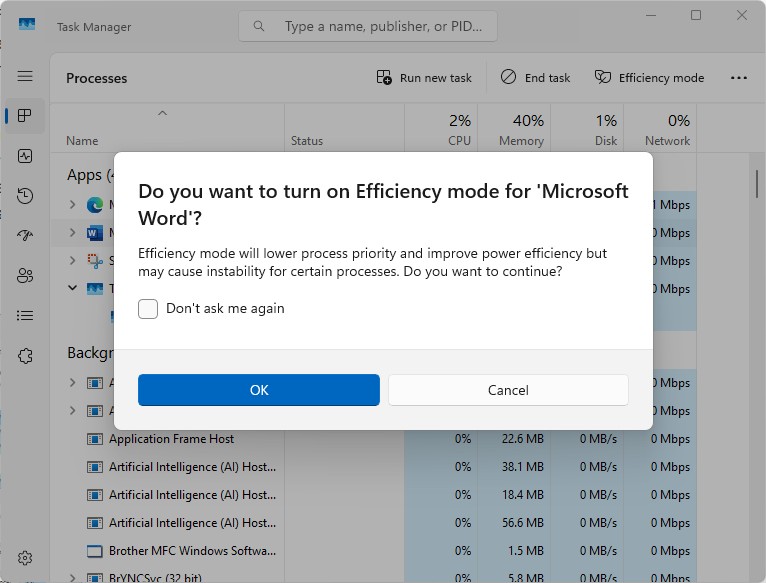
windows task manager with turn on efficiency mode pop-up

Turning on Efficiency Mode for an app.

Preston Gralla / Foundry

4. Use automatic Windows maintenance

In the background, Windows 11 constantly performs maintenance on your PC, doing things like security scanning and performing system diagnostics to make sure everything is up to snuff. It automatically fixes problems it finds, which helps your PC run at peak performance. The automatic maintenance runs every day at 2:00 a.m. if your device is plugged into a power source and is asleep.

However, that feature may have been accidentally turned off, or it may not have run recently if you shut down your PC at night (rather than putting it in Sleep mode) or you haven’t had your laptop plugged in for a while. You should make sure it’s turned on and runs every day. You can also run it manually if you’d like.

Type control in the search box on the taskbar and select Control Panel from the results to run the Control Panel app. In the app, select System and Security > Security and Maintenance. In the Maintenance section, under Automatic Maintenance, click Start maintenance if you want it to run now.

To make sure that it runs every day, click Change maintenance settings, and on the screen that appears, select the time you’d like maintenance to run and check the box next to Allow scheduled maintenance to wake up my computer at the scheduled time. Then click OK.
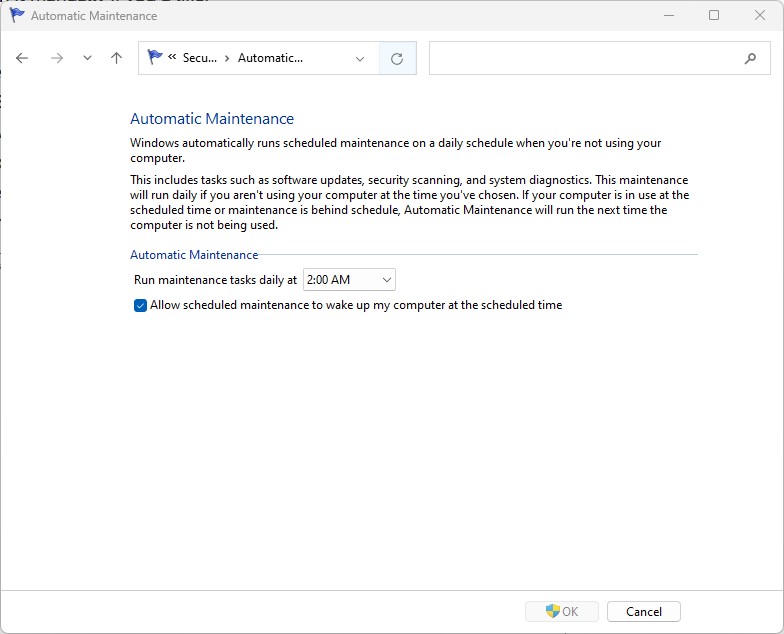
automatic maintenance scheduling screen in windows 11

Here’s how to set a time each day for Windows 11 to run its maintenance tasks.

Preston Gralla / Foundry

5. Kill adware and bloatware

It may be that what’s slowing your PC down isn’t Windows 11, but bloatware or adware that takes up CPU and system resources. Adware and bloatware are particularly insidious because they may have been installed by your computer’s manufacturer. (This is generally not a problem for business PCs but is very common on consumer devices.) They typically run automatically at startup without you even knowing it. You’ll be amazed at how much better your PC will run if you get rid of it.

Start by running a system scan to find adware and malware. If you’ve already installed a security suite such as Norton Security or McAfee LiveSafe, you can use that. Microsoft Defender Antivirus, the anti-malware tool built into the Windows Security app, also does a great job. Type windows security in the search box, press Enter, and on the screen that appears, click Virus & threat protection and then click Quick scan. Windows Security will look for malware and remove any it finds.

You should get a second opinion, though, so consider a free tool like Malwarebytes. The free version scans for malware and adware and removes what it finds; the paid version offers always-on protection to stop infections in the first place.
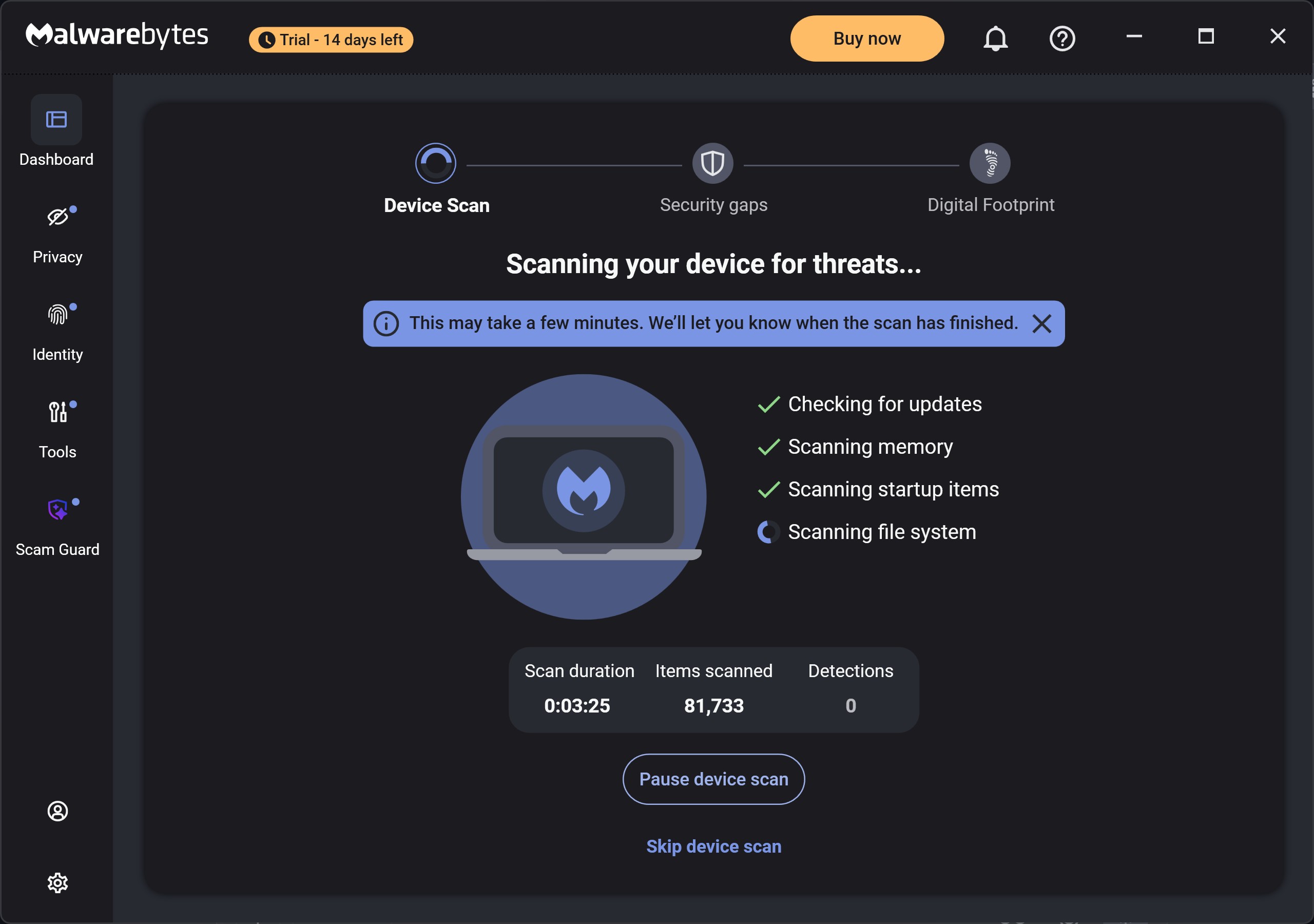
screenshot of malwarebytes software scanning for threats

Malwarebytes scans for and removes malware.

Preston Gralla / Foundry

Now that you’ve done all that, check for bloatware and uninstall it. A good free anti-bloatware tool is Bulk Crap Uninstaller. You can also go to the website Should I Remove It? — it offers recommendations on what software is useful, and what you can uninstall.

There’s a section of the website devoted to advice on how to remove bloatware on PCs from specific manufacturers. I highly recommend going there, because it lists all the bloatware different manufacturers install on their PCs. That section of the site also compares how much bloatware major manufacturers ship on their PCs. It rates Toshiba as having the most and Acer as having the least.

Finally, when you buy a new PC online, check whether there’s an option to leave off trial software and software you don’t need to run your PC. That will stop bloatware from getting on your system in the first place.

6. Turn off search indexing

Windows 11 search performs indexing in your hard disk in the background, allowing you to search your PC more quickly than if no indexing were being done. That’s good for fast searches, but not so good for slower PCs, because indexing can cause a performance hit. You can give a slower machine a speed boost by turning off indexing. Even if you have an SSD disk, turning off indexing can improve your speed, because the constant writing to disk that indexing does can eventually slow down SSDs.

To turn it off, type services.msc into the search box on the taskbar and press Enter. The Services app appears. Scroll down to either Indexing Service or Windows Search in the list of services. Double-click it, and on the screen that appears, click Stop. Then reboot your machine. Your searches may be slightly slower, but you also may not notice the difference. You should, though, get an overall speed boost.
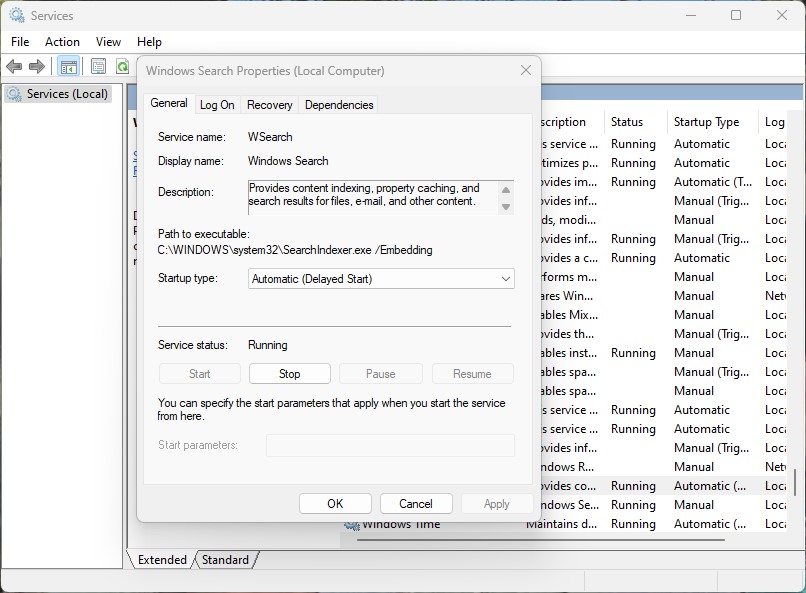
turning off windows indexing

Here’s how to turn off Windows 11 indexing.

Preston Gralla / Foundry

Alternatively, you can turn off indexing only for files in certain locations. In this way, you can still index files and folders you often search for but turn off indexing for the rest of your hard disk. So you’d still get fast searches for files you use often, while increasing your PC’s performance.

To do it, type index in the Windows 11 search box and click the Indexing Options result that appears. The Indexing Options page of the Control Panel appears. Click the Modify button, and you’ll see a list of locations that are being indexed, such as Microsoft Outlook, your personal files, and so on. Uncheck the box next to any location, and it will no longer be indexed.

7. Clean out your hard drive

A bloated hard drive filled with files you don’t need can slow down your PC. Taking a few minutes to clean it can give an immediate speed boost. A built-in Windows 11 tool called Storage Sense will do the job for you.

Launch the Settings app, select System > Storage, scroll down to the “Storage management” section, and next to Storage Sense, move the toggle from Off to On. From now on, Windows will constantly monitor your PC and delete old junk files you no longer need — temporary files, files in the Downloads folder that haven’t been changed in a month, and old Recycle Bin files.
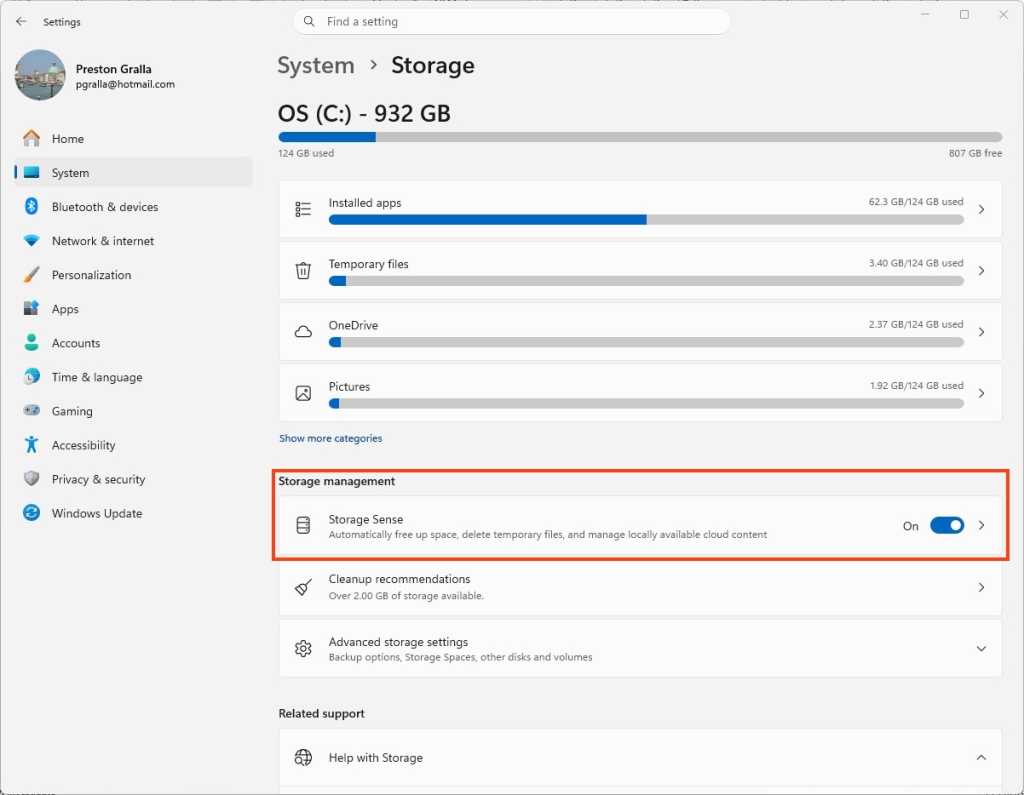
screenshot of windows settings  /> system > storage screen with storage sense toggle highlighted

Here’s where to turn on Storage Sense.

Preston Gralla / Foundry

You can also customize when Storage Sense runs and what should be deleted automatically — for example, whether to delete files from the Downloads folder after they’ve been there for more than 30 days. To do it, click the right-facing arrow next to the Storage Sense On/Off slider.

8. Disable shadows, animations, and visual effects

Those who like eye candy are probably big fans of Windows 11’s shadows, animations, and visual effects. They typically don’t affect performance on fast, newer PCs. But they can exact a performance hit on older, slower machines.

If you’ve got a slower PC, turn them off. To do it, in the Windows 11 search box, type sysdm.cpl, press Enter, and then click the sysdm.cpl icon. That launches the Control Panel’s System Properties dialog box. Click the Advanced tab and click Settings in the Performance section. That brings you to the Performance Options dialog box. (Make sure you’re on the Visual Effects tab of the dialog box.) You’ll see a varied list of animations and special effects.
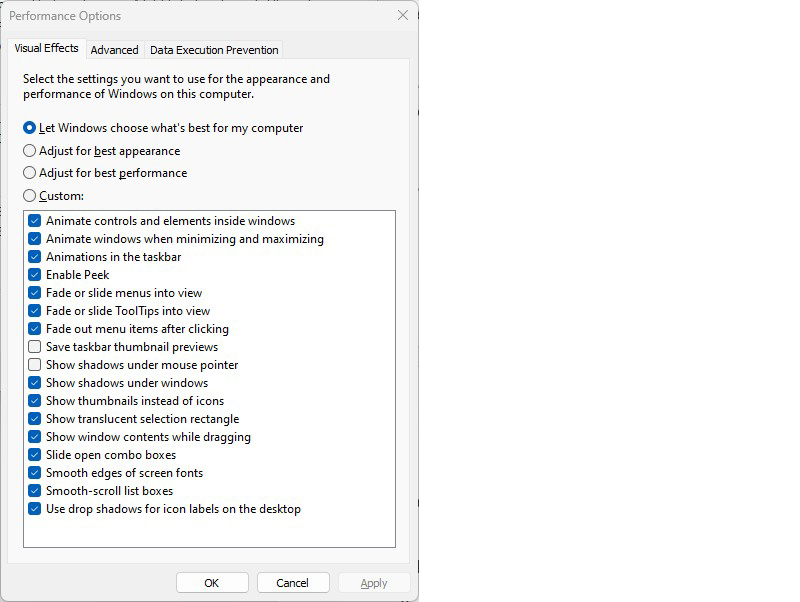
performance options dialog box listing animations and other options to turn off for faster performance

The Performance Options dialog box lets you turn off visual effects that might be slowing down Windows 11.

Preston Gralla / Foundry

If you love to tweak, you can turn individual options on and off. These are the animations and special effects you’ll probably want to turn off, because they have the greatest effect on system performance:

  • Animate controls and elements inside windows
  • Animate windows when minimizing and maximizing
  • Animations in the taskbar
  • Fade or slide menus into view
  • Fade or slide ToolTips into view
  • Fade out menu items after clicking
  • Show shadows under windows

However, it’s a lot easier to just select the Adjust for best performance option at the top of the screen and click OK. Windows 11 will then turn off the effects that slow down your system.

9. Disable transparency

To get an even bigger speed boost, go beyond turning off shadows, animations, and visual effects. Also disable the transparency effects in the taskbar and other Windows 11 locations. Windows does a surprising amount of heavy lifting to create transparency effects, and turning them off can make a difference in system performance.

To do it, run the Settings app and select Personalization > Colors, then move the Transparency effects slider to Off.
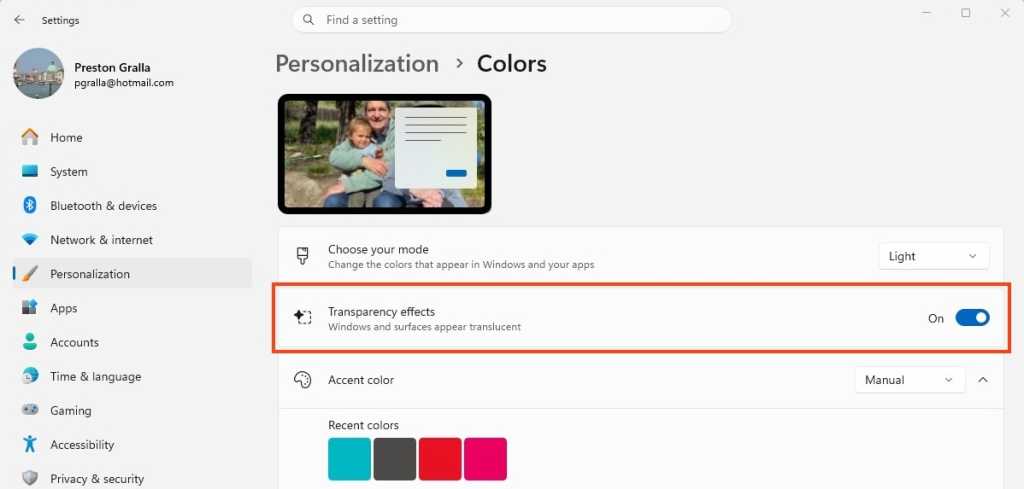
screenshot of windows settings  /> personalization > colors screen with transparency effects toggle highlighted

Turning off Windows 11’s transparency effects can help speed up performance.

Preston Gralla / Foundry

10. Change your power settings

Your Windows 11 PC’s power settings let you balance its energy use with its performance. If you’re using the most power-efficient setting, you’re slowing down your PC, because the setting reduces your PC’s performance to save energy. (Even desktop PCs typically have a power-saving setting.) Changing your power setting to one of the less power-efficient options will give you an instant performance boost.

To do it, run the Settings app, then choose System and click the right-facing arrow next to Power. Depending on whether you’re using a laptop or a desktop PC (and if you’re using a laptop, whether it’s plugged in), you’ll see either a “Plugged in” or “On battery” setting that lists the power mode you’re using. Click the drop-down arrow next to it and choose the setting you want.
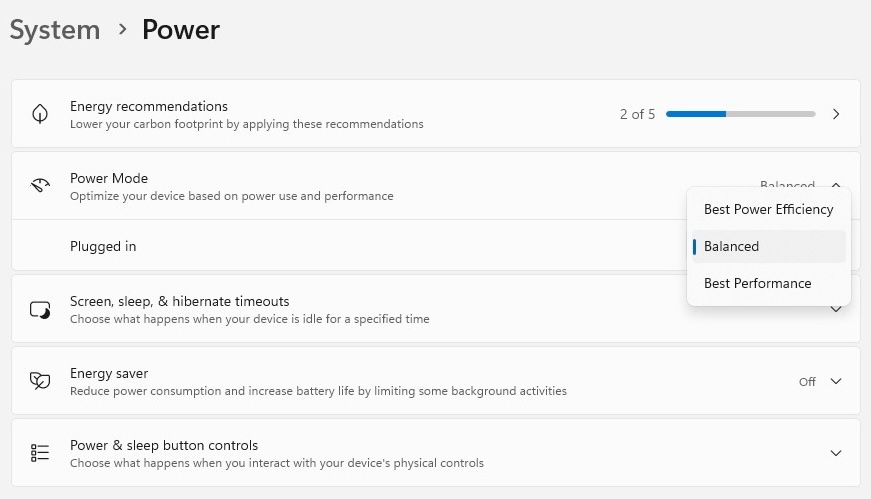
changing power mode in windows 11 settings

Change your power settings to give your PC a performance boost.

Preston Gralla / Foundry

Best Performance gives you the most oomph but uses the most power. Balanced finds a happy medium between power use and better performance, and Best Power Efficiency does everything it can to give you as much battery life as possible. Desktop users have no reason to choose Best Power Efficiency, and even laptop users should consider the Balanced option when unplugged.

11. Turn off Windows tips and tricks

Windows 11 constantly watches what you’re doing on your PC and gives you tips about things you might want to do with the operating system. I’ve never found these tips helpful. And I don’t like the privacy implications of Windows constantly taking a virtual look over my shoulder. (Also see: How to protect your privacy in Windows 11.)

Beyond that, this monitoring can also make your PC run more sluggishly. So to speed things up, tell Windows to stop being so nosy and giving you advice. To do it, run the Settings app and select System > Notifications. Scroll down to Additional settings and click the down arrow. From the options that appear, uncheck the box marked Get tips and suggestions when using Windows.

screenshot of Windows notifications additional settings with windows tips checkbox

Turn off Windows’ suggestions to help things run more smoothly (and regain a measure of privacy).

Preston Gralla / Foundry

12. Disable Game Mode

Windows 11’s Game Mode optimizes your PC for playing games. When it detects that you’re playing a game, it prioritizes system resources for gaming, taking them away from other apps and background processes. That’s great for serious gamers, but when you’re not playing games, it can slow down your system because it keeps some system resources in reserve in case you start playing a game. It occasionally causes stability issues as well. So turning off Game Mode may be able to give your PC a quick boost. (You can always turn it back on again when you want to play a game.)

Game Mode is turned on by default, so even if you’ve never played a game on your PC, it’s probably enabled. To turn it off, go to Settings > Gaming > Game Mode and move the Game Mode slider to Off.
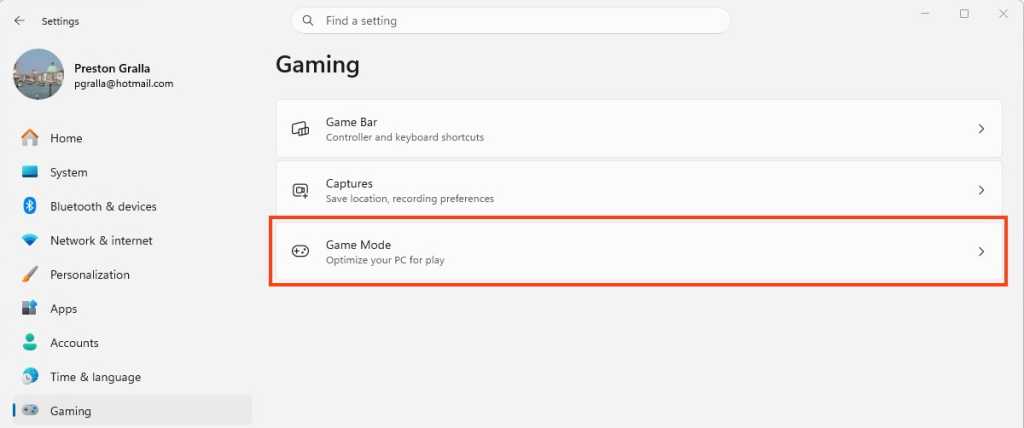
screenshot of windows settings  /> gaming screen with game mode area highlighted

Game Mode can sometimes cause stability and performance issues, so turning it off may give your PC a boost.

Preston Gralla / Foundry

13. Update device drivers

Your Windows 11 PC can become a slowpoke if its drivers are old and in the way. Outdated drivers can exact a big performance hit. Graphics drivers are often the biggest culprit in driver-related slowdowns. To check whether your graphics driver is outdated, and to update to the latest one:

  1. In the Windows search box, type device manager and click on the Device Manager icon that appears.
  2. Scroll to the Display Adapters entry and click the side-facing arrow to expand it.
  3. Right-click the driver, and from the context menu that appears, select Update Driver.

You’ll be asked whether to have Windows search for an updated driver, or whether you want to find one and install it manually. Your best bet is to let Windows do the work. Follow the on-screen instructions to get the driver installed.

You can use the Device Manager to update all your drivers this way. That’s time-consuming, so consider asking Windows to do the work for you. To do it, launch the Settings app (pressing the Windows key + I is a good shortcut for doing it) and select Windows Update from the left pane.  Select Advanced Options > Optional Updates. You’ll see a list of all the updates Windows has found but hasn’t installed. Select any of the drivers you want to install, then click Download & install.

screenshot of windows update  /> advanced options > optional updates screen listing an intel driver update

Tell Windows Update to update your drivers.

Preston Gralla / Foundry

14. Turn off background app permissions

Some apps run various processes in the background even if you don’ t launch them. You’ll likely never know they’re doing it, and they can cause unexpected slowdowns and a sluggish PC. Microsoft says these background processes do things such as syncing or sending notifications. That can slow your PC down, especially if more than one app is doing it.

You can head off performance problems by not allowing the apps to run in the background. To do it:

  1. Go to Settings > Apps > Installed apps.
  2. Click the three horizontal dots on the right of any app whose permissions you want to turn off and select Advanced options.
  3. Click the dropdown under “Background app permissions,” and choose Never if you want to stop the app from ever running a process in the background, or Power optimized if you want to let Windows decide whether to let the processes run when they won’t cause your PC to take a performance hit.
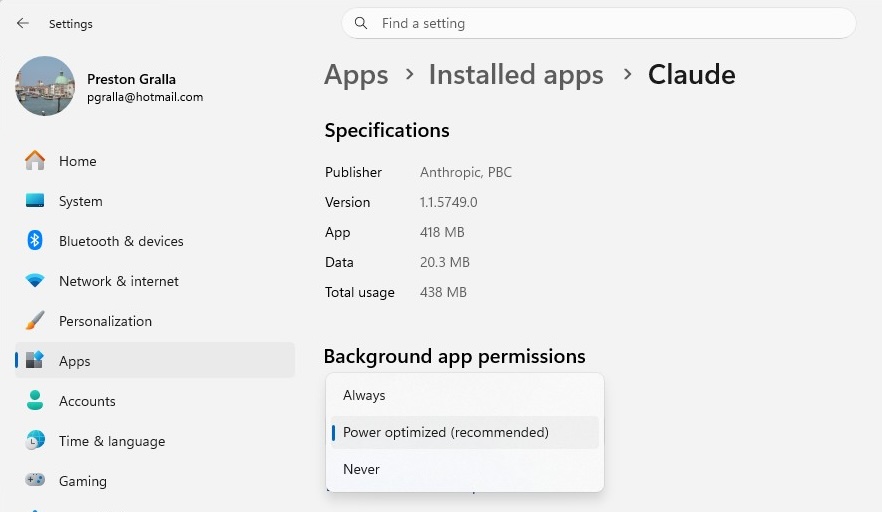
screenshot of settings  /> apps > installed apps > claude with background app permissions dropdown menu

Managing background app permissions properly can give your PC a performance boost.

Preston Gralla / Foundry

15. Roll back your PC to a previous state

Sometimes your PC will slow down for no apparent reason, and stay slow. It could be a new driver slowing your system down. Perhaps accidentally you changed a system setting that caused the problem. It can be difficult, and often impossible, to get to the root of these kinds of problems and fix them.

If you’ve noticed that your computer has become sluggish recently, there’s something that might solve the issue: Restore your PC to the state it was in before the problem began. You can easily do this via System Restore.

To do it:

  1. Make sure System Restore is turned on by going to Settings > System > About, and under the “Device info” section, click System protection.
  2. From the screen that appears, click Configure and select Turn on system protection if it’s not already turned on. Click OK.
  3. You’ll be sent back to the System Protection screen. Click System Restore.
  4. On the screen that appears, select Recommended restore and click Next if you want to revert to the most recent restore point. Select Choose a different restore point if you want to choose one yourself, and click Next.
  5. Restart your PC. It will revert to its previous state. Note that when you do this, your documents, pictures, and personal data won’t be deleted.

turning on system restore in the restore settings dialog box

Here’s how to turn on System Restore.

Preston Gralla / Foundry

16. Restart Windows

Here’s one of IT’s not-quite-secret weapons for troubleshooting and speeding up a PC: shut it down and restart it. Doing that clears out any excess use of RAM that otherwise can’t be cleared. It also kills processes that you might have set in motion and are no longer needed, but that continue running and slow your system.

If your Windows 11 PC has turned sluggish over time for no apparent reason, you may be surprised at how much more quickly it will run when you do this. I can vouch for it, and I restart my Windows 11 PCs regularly even if they’re not sluggish, just as a precautionary measure.

This article was originally published in February 2023 and most recently updated in June 2026.

More Windows 11 tips:

Why Waymo settled for the wrong car

Forget “Florida Man.” Want to hear a California Man story? 

Here goes. 

A California man rolled up to a yoga studio in San Francisco’s Marina District in a self-driving Waymo car, walked into the studio, grabbed an armful of yoga shorts, got back in the Waymo and took off. 

Six months later, police still haven’t found him, according to a story this week in The San Francisco Chronicle. Since the rider’s credit card information didn’t lead to an arrest, we can assume the perp used a stolen phone’s Waymo account and financial information to hail the ride. And by the time police requested interior video of the man’s face, Waymo had already deleted it. 

This is a “California Man” story in part because of the association of Waymo with the city of San Francisco. Soon that association will be obsolete. (In fact, while Waymo is headquartered in San Francisco and is more visible there, Arizona got Waymos two years before San Francisco did.) 

At the moment, Waymos are publicly available to riders in 11 US cities — San Francisco, Phoenix, Los Angeles, Austin, Atlanta, Miami, Orlando, Dallas, Houston, San Antonio, Nashville.

Before long, riders will be able to enjoy robot car rides from Waymo in Las Vegas, San Diego, Washington DC, Denver, Detroit, Baltimore, Boston, Charlotte, Chicago, Minneapolis, New Orleans, New York, Philadelphia, Pittsburgh, Sacramento, Seattle, St. Louis, Tampa, London, and Tokyo.

Historically, Waymo has been taking a bath on rides. 

(I’m not talking about recent stories where Waymo cars have driven onto flooded roads. On May 12, Waymo issued a voluntary recall of 3,791 cars after a software defect allowed an autonomous vehicle in April to drive into a flooded, impassable roadway in San Antonio and be swept into a creek. A week after the recall, the company paused all freeway rides and suspended service in Atlanta, Austin, Dallas, Houston, San Antonio, and Nashville because of construction-zone navigation issues.)

To date, self-driving ride-hailing services like Waymo are a loss-leader business. Waymo is secretive about its costs, but independent estimates suggest that a $20 ride for the rider may be a $50-$100 ride for Waymo, when you factor in all costs. 

But help is on the way. 

Cars that drive themselves don’t pay for themselves

A big part of why Waymo rides have been so costly is that the car is a retrofitted Jaguar I-PACE. It’s true that Waymo got a deal on the roughly $70,000 car (a steal at $50,000 per vehicle because the company bought thousands of them). 

But then Waymo had to bolt on all kinds of costly sensors and electronics to make them self-driving, including a roof-mounted lidar assembly of five units, 29 cameras all around the car, six radar units, a custom Waymo-designed AI inference compute platform, and the wiring harness and power distribution system. 

Estimates for the total cost per car for Waymo are in the $120,000 to $200,000 range. 

Another problem is that the Jaguar I-PACE is notorious for a lack of reliability, especially involving its batteries and its longevity. Jaguar stopped making I-PACE cars two years ago. 

Finally, Waymo can’t do what regular car owners do and sell the car to recover some of the initial investment. Nobody wants an electric car with a depleted battery covered in electronics and sensors that can’t be used. 

The good news is that we learned this week that used Waymo batteries will be repurposed as backup storage for power grids in California and Texas

Say “Oh, Hi!” to the Ojai

The combination of growth and the end of manufacturing for the Jaguar I-PACE means that Waymo’s next platform is right on time. The car is called the Ojai, named after the unaffordable artsy hippie mecca located 80 miles northwest of Los Angeles. 

Waymo announced last week that the company will soon open Ojai cars to free rides for select riders in San Francisco, Los Angeles, and Phoenix. (See this Redditor’s drone photos  of the current fleet of Ojai cars in Mesa, AZ.)

The Ojai is a purpose-built electric minivan made by Zeekr, an arm of China-based Geely Automobile Holdings. It’s got doors that slide open like an elevator door, more legroom than the I-PACE, three screens for passengers, Braille instructions, grab bars, a flat floor with low-step height for easier entry, charge ports, cupholders, more cargo space, better batteries, faster EV charging, and easier cleaning and maintenance than the I-PACE cars. 

It’s much cheaper for Waymo to buy — and much cheaper and faster to integrate Waymo electronics. 

The Ojai gets Waymo’s sixth-generation Driver as a factory-co-engineered system with just 23 sensors (13 cameras, four lidar, six radar). While that’s far fewer sensors, they’re much more capable than the older generations of Waymo systems. One of my favorite details of the Ojai sensor package is that each car will have 10 sensor wipers with heaters and fluid sprayers specifically designed for snow, rain, and adverse weather. They’re like tiny, high-tech windshield wipers, but for the glass in front of the sensors. Ojai cars will likely do far better in rain and snow conditions. 

Weirdly, the Ojai still has needless controls, like a steering wheel and gas and brake pedals. And the only reason for those is that the US Congress is asleep at the wheel. US. federal motor vehicle safety standards require steering wheels and pedals for street-legal vehicles, and neither NHTSA nor Congress has granted a permanent exemption for purpose-built driverless vehicles. 

Despite the vestigial controls, the difference between the two cars is that the Jaguar was an old-school car designed for drivers, while the Ojai is the new concept for cars, one built for riders. And for riders, the Ojai is better in every way that matters. 

The Chinese factor

There’s only one factor keeping Ojai cars from replacing the full Jaguar I-PACE: They’re  made in China. 

Waymo is getting around the 100% tariff imposed by the Trump Administration by “location-laundering” the build. Zeekr completes the Ojai shells in Gothenburg, Sweden, and because the “substantial transformation” occurs within the EU, the vehicles are classified as EU-origin products. The stripped-down gliders arrive with no modems, ECUs, or autonomy software, and Waymo installs all connected technology at its Mesa facility, which satisfies the Commerce Department’s 2027 and 2030 rules prohibiting Chinese-linked vehicle electronics. 

Some lawmakers are using Waymo as a case study for general anxieties about Chinese technology infiltration into American infrastructure. The other problem is protectionism. If un-tariffed Chinese cars were allowed into the US market, the US car industry would likely be decimated by the competition. Chinese carmakers like BYD enjoy a 25% material cost advantage over Western carmakers. They would enter $5,000 to $10,000 cheaper than comparable U.S. offerings, according to some estimates. 

So, Washington is jittery about Chinese-made cars. 

I drove a BYD rental car in the UK last month. And I can tell you, they’re great cars and very enjoyable to drive. (My only complaint was that the steering wheel was on the wrong side.)

Instead of Waymo taking a risky bet on Ojai cars, they’re instead expanding with Hyundai Ioniq 5 EVs, which are produced locally and will be retrofitted with Waymo’s sixth-generation Driver at that Mesa facility. This is a massive deal in which Hyundai will supply Waymo with 50,000 cars by 2028. 

Waymo hasn’t disclosed plans for Ojai cars, but it’s unlikely to even come close to the number of Hyundai cars it is on the hook for. 

(The company also has around 100 Zeekr cars, but plans to expand that fleet to a few thousand.)

The right solution for Waymo’s next few years would be all Ojai cars with no steering wheel or pedals. The Ojai is purpose-built for autonomous car ride sharing, affordable, and capable in all weather. But that’s not going to happen because of Congressional inaction, China panic, and protectionism in Washington. 

Instead, Waymo’s future is to use too many cars from the past, by which I mean much or most of its fleet will be driverless cars retrofitted from cars that prioritize the driver, rather than the passengers. And reports suggest that the price of Hyundai cars will be comparable to the overpriced Jaguars. 

I’m sure the Hyundai Ioniq 5 will be nice. But an all-Ojai fleet would have been the better future for Waymo. Instead of the right car for the job, Waymo is stuck with an expensive, less comfortable, less capable car than the Ojai. 

Compliance chaos: NY regulators see a data breach — then focus on IT errors

The age-old IT defense when compliance violations are investigated by regulators is to try and keep a low profile — and hope no one looks too closely. But with enhanced SEC interest in all data breaches encouraging regulators around the globe to take those closer looks at IT, data breach disclosure rules are becoming more strict.

While that might be unsettling for cybersecurity executives, it is also disturbing news for IT admins, who could find themselves under a remarkably uncomfortable spotlight. 

Consider this recent move by the New York State Department of Financial Services against the Delta Dental Insurance Company. State officials hit the insurance company for improper and inconsistent enforcement of its own data retention policies; improper incident response plan protocols; and improper notification of the security incident itself. 

The company was fined more than $2 million.

The data retention violations are perhaps the most problematic. Had that policy been enforced properly, much of the stolen data would have been destroyed long before the attackers could have accessed it. 

It’s not simply a matter of whether the IT rules for retention were sufficiently strict. Some regulators — and especially the US Federal Trade Commission (FTC) — focus extensively on companies who don’t do what they say publicly. If a corporate website promises something to customers, the FTC will hold companies to their word. 

Think about that the next time you assign a summer intern to handle your website’s copy. 

Inconsistent implementation of data retention policies can deliver other legal headaches. Having a good policy approved by the general counsel is fine, but it means nothing if all of your people do not follow it strictly. 

Let’s say one of your business units is being sued for having done something naughty. Opposing counsel subpoenas your business records, including emails from a few years ago. Your attorney responds that those email records no longer exist; they were deleted last year in accordance with corporate policy on data retention that says everything of a certain nature has to be deleted after one year. 

Fair enough. But what if opposing counsel in a deposition asks,“Really? Does that policy apply to all records of that nature?” You say that it does. 

“It might interest you to know that we have sworn testimony from four other employees who showed us emails of the same nature that were more than five years old. So why did you adhere to your policy regarding emails that might prove the fraud but somehow you did not delete others? Sounds a little selective, no? I think the judge would agree.”

In the dental case, the company had a strict policy on retention rules. But corporate software was programmed with “the ability to shorten, extend, or disable MOVEit Transfer’s default retention settings on a folder-by-folder or file-by-file basis.” 

The regulators then swooped in because the insurance company “had no written policy or procedure for requesting, reviewing, or approving such changes to folder retention settings.”

The best retention policy would, in theory, have no exemptions. But if you’re going to allow exemptions, you need a precise policy documenting how and when they can occur. There should be a required form so that a manager can write out the reasons for this specific exemption.

The New York state document is an important one to carefully review; it provides an excellent roadmap to how compliance can go wrong — and useful information on how to keep something similar from  happening to your company.

Microsoft makes Linux developers feel more at home in Windows with Coreutils release

Microsoft has announced Coreutils, a new Windows 11 feature that allows developers to run many popular Linux command line utilities natively on Windows from a single binary.

Revealed at this week’s Build 2026 developer conference in Seattle, Coreutils is about reducing what Microsoft terms the “cognitive load” faced by developers when moving between Windows and other platforms.

Currently, accessing the Linux command line utilities that are considered essential in many CI/CD development environments on Windows requires a kludge that involves either opening an emulation such as Git Bash, or a virtualized Windows Linux Subsystem (WSL) terminal.

Both are time-consuming and inefficient. As Microsoft’s announcement puts it: “Developers constantly move between platforms, but familiar commands don’t work consistently, forcing workarounds, lost speed and context switching.”

Coreutils removes the need for this back and forth, allowing developers to run most Linux commands straight from the Windows CMD command prompt, PowerShell, or Windows Terminal.

“Whether you’re moving between Linux, macOS, WSL, containers or cloud environments, the commands and workflows you’ve built over years just work in your Windows environment,” Microsoft said.

Most utilities, but not all

Installed as a single executable (via WinGet: install Microsoft.Coreutils), Coreutils for Windows itself is a Rust rewrite of the GNU uutils/coreutils project that provides commands that are universal across Linux distros.

Fundamental to making Coreutils efficient to manage is the fact that individual Linux commands run from a multi-call executable which maps via NTFS hardlinks pointing to each command. The advantage of this approach is that there’s only one binary to install, one binary to sign, and one binary to patch or update.

Microsoft lists 75 Linux utilities supported by Coreutils, including commonly-used commands such as ls, cp, find, grep, find, rm, du, hostname, and uptime.

However, some Coreutils commands clash with existing CMD or Powershell commands, or are otherwise not possible to execute; Microsoft provides a compatibility table listing conflicts. This means that some commands are not available, specifically: dir, expand, kill, more, timeout, and whoami.

There are also some commands omitted from Coreutils because a command relies on a POSIX Unix/Linux feature that Windows doesn’t implement in a compatible way; some examples are chmod, chown, id, stty, and chroot.

In other cases, the command will execute in one context, CMD, but not in PowerShell. Microsoft explained the complex order of precedence:  “Whether the Coreutils version runs depends on the shell, the PATH order, and (for PowerShell) the alias table.”

As well as Coreutils, the Build 2026 developer conference also saw Microsoft announce WSL containers CLI and API to deploy Linux containers on Windows, a new framework for autonomous agents with open source governance tools, and Microsoft Scout, an AI agent designed to automate tasks in Microsoft 365.

This article originally appeared on InfoWorld.

Apple to open its first developer center in Europe

Apple in recent years has opened Apple Developer Centers in Cupertino, CA, Shanghai, Singapore, and Bengaluru to allow developers to meet, exchange ideas or get help from trained staffers.

It is now clear a new developer center will open in Europe, specifically in the German capital of Berlin, later this year. “Europe is home to an extraordinary community of developers who build apps that connect people, encourage creativity, and drive innovation,” says Susan Prescott, Apple’s vice president of Worldwide Developer Relations, said in a statement.

Developers will be able to receive support for their apps, regardless of whether they are built for iOS, iPadOS, macOS, tvOS, macOS, or watchOS.

The announcement comes just a few days before the company’s big Worldwide Developer Conference (WWDC) gets under way.

What Safari reveals about Apple’s AI strategy ahead of WWDC

Apple’s latest Safari privacy campaign is more than pre-WWDC marketing. It is an early signal of how the company plans to frame artificial intelligence (AI): as something that only works if users trust the platform behind it.

The week before WWDC is often significant, as Apple tends to make announcements it simply can’t fit into the keynote itself. This year’s first pre-show reveal is a new campaign focused on privacy that shows how much more private Safari is than rival browsers; there’s even a highly entertaining video that makes the point.

Privacy on Safari

Apple has been building privacy protections into Safari for years. The browser protects you from malicious scripts that might attempt to access passwords or credit card information. Safari also tells you what data an extension wants to access and can restrict access to match your settings. It blocks third-party cookies by default, detects and removes trackers, and has measures in place to prevent data companies from identifying — and following — you through device characteristics. 

That’s even before Apple’s powerful Private Browsing mode, which includes meaningful protections. The company has put together a page packed with resources to explain the privacy protections it has in place across its platforms.

Privacy is critical to Apple — not only because the company regards it as a human right, but because it correctly recognizes that to make new generations of sensor-laden technologies it must ensure privacy is protected. Without privacy and trust, people won’t use the technology.

Trust is the product, not you

The truth is that people are becoming increasingly concerned about how the digital devices we depend on for convenience are now being used for different kinds of surveillance, and we need to be convinced that our personal data is protected. We do not want every aspect of our life to become fodder to feed a digital dystopia, even as we still want the positive solutions technology promises.

Think about the Apple Watch. Consider the data it gathers: distance walked, calories burned, and more — it’s a rich trove of personally identifiable data that no one really wants to share with others without consent. Apple Watch is not the only Apple device that is gathering information, even your web browser captures a great deal of it. Hence, the focus on Safari in Apple’s new campaign.

Privacy will become an even greater concern as AI spreads. Data brokering services already make extensive use of AI to analyze and identify patterns in the online data they harvest. AI deployed without strong privacy protections poses serious risks to the way we live, while the consolidation of AI ownership in the hands of a few companies risks creating dangerous imbalances of power. That’s the context in which private data needs to be protected, making privacy an essential component of a positive tech-augmented future. 

Why the AI era raises the stakes

Apple’s focus on privacy is far from new; it has been consistent in this work for many years. Competitors often accuse Apple of hypocrisy, but the company has been arguing for privacy’s importance for more than a decade. Others have adopted some of the same principles, though not all of them — and while Apple may sometimes use privacy as a moat for its own products and services, that does not diminish its value.

It’s with all this in mind that I consider Apple’s latest privacy ad campaign and its rollout just before WWDC, where it is expected to introduce new AI services. That Apple’s new privacy campaign seems not to have made the final cut for the show tells me the company has much more to discuss on the topic, particularly around Apple Intelligence.

What Safari’s signals suggest

When Apple introduces its new AI features at WWDC it will do so while celebrating the privacy built into them. The current privacy ad campaign will be part of an overall push as the company explains that its ecosystem can run third-party AI services while also offering its own bespoke Apple Intelligence AI to do really useful things in complete privacy.

This isn’t just a competitive moat, it’s a realistic assessment in practice. It shows that Apple understands that in the age of AI, privacy matters more than ever. As AI becomes central to everyday digital experiences, privacy is no longer optional — and Apple is prepared to make the case to support it.

You can follow me on social media! Join me on BlueSky,  LinkedInMastodon, and follow The Core.

Asana launches AI ‘chief of staff’ to keep projects on track

Asana has launched an AI personal assistant that can track various data sources to alerts users when a work project runs into problems and recommends next actions.

It’s one of a range of product announcements made Thursday at the company’s Work Innovation Summit in London, including updates to its existing AI teammates product. These follow Asana’s recent acquisition of AI workflow automation software vendor StackAI for $75 million.

Asana Dash is described as an “AI chief of staff” that can help users stay up to date on work projects by accessing information in Asana as well as across email, calendar and team messaging apps, said Arnab Bose, Asana’s chief product officer. “Keeping people in their ‘zone of genius’ and hooking up all of these unstructured signals to the structure of Asana — that’s what Dash does best,” said Bose.

The AI assistant can access the same Asana project information as the user, and can flag when problems occur that could push a project off-track. Asana Dash can then act to address problems, such as posting messages within Asana on behalf of the user or directing an AI teammate to take action. (Asana Dash will ask the user before making any changes.)

“Asana is building on recent acquisitions, and earlier investment in a graph database focused on human connections — the Asana Work Graph — and its position within a well-integrated flow of work to deliver to each worker an executive assistant rooted in the context of their job,” said Wayne Kurtzman, IDC research vice president.    

The Asana Dash personal assistant is enabled by an expanded Asana work graph — the data model related to work carried out by teams in the application. Asana has in the past been more focused on tasks, projects, portfolios, and goals, said Bose, but the work graph now includes new sources of data, linking to employee calendars and accessing meeting transcripts, for instance, alongside other documents and databases.

There are also updates to the AI teammates feature — collaborative AI agents that multiple human coworkers can interact with — which are now more powerful, said Bose. This includes additional skills and integrations with third-party apps such as Gmail, Slack, Outlook, Figma, and Canva.

As for the StackAI acquisition, Bose said it allows Asana to extend the reach of AI agents into a variety of business apps more easily and reliably, building ] on Asana’s “system of action” function. The latter tracks work carried out across an organization, he said, and can automate the complex processes that make up many enterprise workflows. 

“If you look at StackAI’s website, the thing that they are really, really great at is building these complex, multi-step processes,” said Bose. The aim is to combine StackAI’s agent builder with integration expertise agents already available in Asana. 

“So, the idea is when an AI teammate or Dash recommends the next best action, they will be able to choose downstream actions based on the portfolio of approved workflows that you’ve built out in StackAI.”

Overall, the announcements help Asana provide a platform that combines agents and workflow automation with AI assistance that aids humans to work more effectively, said Bose.

“Our terminology for this is a ‘human-agent operating system,’ because automation, I feel, is a little reductive in the sense that there are some things that are fully automated, but a lot that you’d want a human being and an AI agent to coordinate on and align on,” he said.

Asana did not immediately respond to a request for pricing and availability details for Asana Dash.

Google brings local AI agents to laptops with Gemma 4 12B

Google has released new tools that allow developers to run agentic AI workflows locally using Gemma 4 12B, a 12-billion-parameter model from Google DeepMind.

In a blog post, the company said the model, combined with the Google AI Edge stack, can be used to build and test applications on everyday machines. The model-runtime combination supports capabilities such as autonomous data processing, visual insight generation, webpage creation, and tool use.

The release includes Google AI Edge Gallery for macOS, where developers can use Gemma 4 12B to generate and run scripts for tasks such as data analysis. Google also said its Eloquent voice dictation and editing app now runs fully on-device on macOS, with support for local transcription and voice-driven text editing.

Google has also expanded LiteRT-LM, its lightweight command-line tool for running language models locally, with a new serve command. The company said this allows the CLI to act as a local LLM server and lets developers connect Gemma 4 12B to standard tools, SDKs, and frameworks through a local endpoint.

“Your data stays on your device while maintaining reliable responsiveness, utility, and cost efficiency,” the company said in the blog post.

The announcement comes as enterprises are looking beyond large, general-purpose models for some AI workloads. Gartner predicted that by 2027, organizations will use small, task-specific AI models at least three times more than general-purpose large language models, citing demand for more contextualized and cost-effective AI systems.

Challenges to overcome

But running agents on employee devices brings a number of problems. Companies must work within the limits of endpoint hardware, which can restrict the size of models that run effectively and the number of model instances that can operate at one time.

“While the AI can now fit on a laptop, enterprise IT infrastructure is largely unprepared to manage it,” said Rishi Padhi, principal analyst at Gartner. “Even highly optimized models like the Gemma 4 12B require around 16GB of unified memory or VRAM to run alongside standard applications. Many standard-issue enterprise laptops lack the memory bandwidth and NPUs/GPUs required for fluid, multi-turn agentic execution.”

Anand Joshi, AI analyst at TechInsights, said local deployment also changes the nature of the workloads. On a PC, search may mean finding information across internal folders and files. In a data center, the same function could involve searching the internet or querying a large database such as SQL.

“The framework for local deployment of agentic AI is different from that of a data center,” Joshi said. “The models are smaller; you can run only one instance of a large model at a time. You are limited by memory, CPU, and so on.”

Security and governance are also likely to become bigger concerns as AI agents move closer to enterprise endpoints. Agentic AI is designed to take actions, creating new security risks when local models are given access to employee files or allowed to interact directly with applications and scripts.

“Sandboxing these agents without breaking their utility is still a major operational challenge,” Padhi added. “And all this while enterprises need to audit AI usage for compliance and security. When inference happens entirely offline, capturing logs, tracking model drift, and ensuring employees are using the approved, compliant ways for a model becomes incredibly difficult.”

The cost tradeoff

Running AI agents locally could reduce some cloud inference costs, but the savings may be offset in the near term by higher spending on endpoint hardware and management.

“First and foremost, it is an OpEx-to-CapEx shift, as it shifts that financial burden by forcing accelerated hardware refresh cycles for premium PCs or edge devices,” Padhi said. “It would require buying expensive, high-memory laptops for employees at a time when memflation in the hardware industry is already driving up end-user average selling prices for laptops.”

Many enterprises refreshed PCs in 2025 to support Windows 11, but at that point, most AI inference still ran in the cloud, and the case for on-device AI remained unclear, Padhi said.

Enterprises may therefore move cautiously, buying AI-capable PCs only where local inference has a clear business case.

Over time, however, on-device AI could make enterprise AI spending more predictable by reducing exposure to variable cloud inference bills. The tradeoff is that companies may face a higher baseline cost for equipping and managing employees’ devices.

Complementing cloud AI

For enterprises, local AI is unlikely to replace cloud-based AI outright. Analysts said local AI is more likely to be used for workloads that benefit from endpoint processing, especially when applications must operate offline or when privacy and response times are critical.

“For local agentic AI to proliferate, the use cases on edge will have to complement data center/cloud use cases,” Joshi said. “I don’t expect local agentic AI to replace cloud AI, but it has potential to take a slice away from the cloud, and models like Gemma are significant steps towards enabling that.”

The market, Joshi added, is still determining where local AI fits best. “I estimate that use cases that require privacy or have strict latency needs will move to local node first, with further migration of others in the next 2-3 years,” he said.

Padhi said model placement will depend on the privacy requirements of a workload, the computing power it needs, and where the relevant data resides. Tasks such as code generation or analysis of local files could increasingly run on employee devices, while enterprise-wide RAG systems and more complex AI workflows are likely to remain cloud-based.

The article originally appeared on InfoWorld.

AI saves workers a day a week, but they don’t know what to do with it

A report released Wednesday by Boston Consulting Group (BCG) indicates that many organizations are having difficulty converting efficiency gains that are AI-driven into any sort of measurable value.

The fourth edition of the consultancy’s annual Global AI at Work Survey reveals 42% of frontline employees who use AI on a regular basis save upwards of a full day each week; however, 66% are not given guidance on what to do with time they save, and “more than half don’t redirect it to strategic work.”

The report, AI at Work: Strategy Matters More Than Tools, is based on a global survey of 11,749 employees in 14 markets, from industries ranging from financial services to the healthcare sector.

David Martin, global leader of people and organization work at BCG, and the report’s lead author, said via email that the number of employees lacking the required guidance is surprising, “but it also tracks with what we see in many AI transformations. Companies have moved quickly to give people tools, but many have not yet redesigned the work around those tools.”

Saved time, he added, does not automatically become value. If a frontline employee saves a few hours a week, but has no direction on whether to use that time for customer service, quality improvement, innovation, or faster execution, “that value can simply leak out of the organization”

The fix is for leaders to change the scoreboard, Martin said: “Don’t just measure AI adoption or hours saved. Decide where that time should go, measure whether it is being reinvested, and give managers clear guidance on how to help teams use it. This is where AI transformation becomes a management challenge, not just a technology rollout.”

In fact, said Vinciane Beauchene, a managing director and partner at BCG and one of the report’s five co-authors, “the first wave of AI focused on individual productivity. The coming wave will need to transform collective work.”

“Everyone is talking about AI replacing work,” she said, “but it is in fact really about rethinking the human value-add inside.”

A managerial revolution underway

According to Beauchene, “this is the role of leaders. Our survey reveals a true managerial revolution in the age of AI; 65% of managers and leaders now believe agents will take over at least half of their job in the next three years, and frontline workers see their jobs evolving towards more managing and directing AI.”

A BCG release stated that the survey also highlights the continued emergence and maturity of AI agents, with 30% of respondents saying that agents are already integrated into workflows, more than double the number from last year’s report (13%).

Other key findings revealed that AI adoption among frontline workers has surged, with 74% saying they now use it daily or a few times a week, which is up 23 percentage points from a year ago. In addition, six out of 10 people believe that, within the next three years, AI agents could do at least half of their jobs.

And a survey slideshow released by the company pointed out, “the AI ‘honeymoon’ won’t last unless leaders bring strategic clarity driving sustained impact AI’s novelty and cognitive stretch fuel enjoyment early on. But sustained joy comes from strategic clarity. Employees thrive when the direction is real and the message reaches them with strong CEO involvement.”

Strategic clarity is a key differentiator

The report suggests that CEOs take a holistic approach to AI transformations by focusing on business outcomes as opposed to AI usage, investing in “redesigning work end-to-end, not in more tools,” placing people at the heart of that redesign, and governing AI not as a one-off program, but as a moving target.

Overall, BCG says that strategic clarity, “more broadly emerges from the survey as the most crucial differentiator in sustaining AI’s impact over time as organizations are moving past simply implementing AI tools in use case deployment initiatives.”

Increasingly, it adds, “the focus is shifting to redesigning end-to-end workflows and processes to reimagine functions, as well as to building and innovating new business models and products to drive growth, which have nearly doubled year-over-year.”

Global leader of BCG’s tech build and design unit BCG X Sylvain Duranton, also a report co-author, added, “employees don’t push back on AI intensity; they thrive when the strategy is clear, the direction is real, and the message reaches them.”

He added, “Business value and employee enjoyment aren’t trade-offs. The organizations capturing the greatest business value are the same ones where employees enjoy work the most.”

Despite the opportunity, the report notes that only one-third of frontline employees say that leadership’s communications about AI are clear, and only 28% “see a strong connection between what leaders say and what the organization actually does.”

However, Martin said, management can’t deal with this situation on its own. “CIOs have a critical role, but this is not a problem they can solve alone, and I would not frame it as something IT created by itself,” he noted.

Many organizations, he said, “started with the natural first step of getting tools into people’s hands safely and at scale. That was necessary, but it is not sufficient.”

The next phase “has to be much more cross-functional,” he said. “CIOs should help set the technology foundation, governance, data model, and measurement systems, but they also have an important role in creating strategic clarity. Employees need to understand why the organization is using AI, where it is meant to create value, and how it should change the work.”

Martin pointed out that CIOs should also pay close attention to cognitive load, especially on technology teams, as those teams are often the heaviest AI users.

“This means they may be among the most exposed to the mental strain that can come with reviewing outputs, managing AI tools, and keeping up with constant change,” he observed. The biggest gains come when technology strategy, workforce strategy, and employee experience move together. If AI remains only an IT program, companies will “undercapture” the value.

New expectations

The abundance of AI activity is also having another effect, in that 60% of respondents say the bar for work that counts as ‘good enough’ is now higher.

That, said Martin, is because AI is changing expectations. “If a tool can produce a first draft, summarize research, generate options, or automate a routine task, then ‘good enough’ moves up the value chain,” he said. “People are being asked to spend less time producing basic output and more time exercising judgment like checking quality, improving the answer, making decisions, and applying context.”

While that can be a good thing, he said, because it can make work more interesting and more valuable, “it also explains why employees are feeling more mental strain. The work that remains is often more complex. Leaders need to recognize that AI does not just make people faster, it changes what excellence looks like. That means companies need to update training, performance expectations, and management support accordingly.”

This article originally appeared on CIO.com.

EU sets out plans to reduce reliance on US cloud providers

The European Union has now published a set of measures aimed at boosting Europe’s tech industry to help reduce reliance on US and Chinese suppliers for AI, cloud, and semiconductors. The proposals include rules to restrict the use of US hyperscalers for certain public sector procurement purposes, but stop short of banning them outright.

“Technological sovereignty does not mean protectionism. Europe remains grounded in openness, partnership, and fair competition,” Henna Virkkunen, executive vice president for Tech Sovereignty, Security and Democracy, said in a statement Wednesday. “At the same time, Europe wants to be in the position to make its own choices, avoiding dependence on single dominant suppliers, especially from non-like-minded countries.”

The European Technological Sovereignty Package — released after several delays — includes two legislative proposals: the Cloud and AI Development Act and Chips Act (CAIDA) 2.0 and the Open Source Strategy and Strategic Roadmap for Digitalization and AI in Energy.

CAIDA aims to triple data center capacity in the next five to seven years by easing restrictions for deployments across the EU. It also includes rules that, if enacted, would require EU public bodies to meet certain sovereignty criteria for cloud service procurement related to certain sensitive workloads.

Amid ongoing trans-Atlantic tensions and a long-time deep reliance on US tech providers, European organizations have become increasingly wary of a “kill switch” that would cut off access to digital services. There are also concerns that US hyperscalers could be compelled to share data with US government under the CLOUD Act and Foreign Intelligence Services Act (FISA), even when data centers are located in Europe.

The CAIDA proposals include four levels of criteria for suppliers; the most basic includes data center infrastructure located and operated in the region – something  many US cloud suppliers already provide – with stricter rules around supplier ownership, full control over the software stack, and more stringent cybersecurity certification.

The majority of existing EU public sector workloads (70%) fall under the first level, with 20% at level 2, and 9% at level 3. Only a small proportion (1%) of the most sensitive workloads would require level 4.

Other proposals include the Chips Act 2.0, a follow-up to the 2023 legislation that sought to improve semiconductor production capabilities; the updated version now aims to boost research and spur demand for domestically produced processors. 

The legislative proposals must be negotiated by the European Parliament and Council of the European Union before adoption.

After a quick 1.1M sales, MacBook Neo set to reshape the PC industry

Apple’s MacBook Neo appears to be a triumph of strategic disruption that has already cast shock waves across the industry — and that energy is still playing out.

Approximately 55,000 MacBook Neo computers have been sold every day since it was introduced in March, according to IDC data (as first noted by TechCrunch). In fact, it looks as if Apple sold 1.1 million of these Macs in the first 20 days of sale, the analysts said.

There’s no real reason to imagine that level of demand has declined very much.

MacBook Neo: Millions sold

After all, not only do these Macs continue to dominate Amazon’s US laptop charts, but supply chain rumors claim Apple has doubled its manufacturing orders. “MacBook Neo shipments have come in better than expected, with the 2026 shipment forecast raised from 5 million to 10 million units,” Apple analyst Ming-Chi Kuo said recently

IDC’s March data may not capture the larger extent of the demand, as IDC analyst Navkendar Singh pointed out that MacBook Neo shipments “began to spike from early April”, which suggests demand has accelerated since then.

MacBook Neo demand exceeded expectations across multiple nations, including in India, where the company shifted 18,000 of them in the opening weeks.

Doing the business

Apple has also instructed processor maker TSMC to manufacture additional A18 processors specifically for its affordable laptop, while earlier speculation has claimed the company has been using ongoing memory price increases as a strategic competitive tool.  (The Neo starts at $599, with a pricier model set at $699.)

By expanding the potential customer base for Macs with a lower cost Neo, Apple is aiming a claim at the biggest-selling part of the PC market. And it is doing so even as rapidly increasing component prices force others to choose between higher product prices and profitability, or much-reduced margins in to compete at the same price. levels

That’s a losing battle; competitors for the most part can’t hope to match Apple’s bargaining position when it comes to the cost of components like memory because they don’t have the same scale. That means that even when component costs increase for everybody, Apple pays less, because it orders more. 

That scale means that for many component suppliers, it’s Apple’s business that keeps the meat on the table while other customers merely contribute the gravy. So, suppliers are happy to make deals with Apple to secure that main course — to continue the analogy — but are less likely to match those deals for dessert. As such, Apple is expected to be the only laptop vendor to see growth this year.

Apple’s great game

IDC’s figures confirm Apple’s strategy is working, with strong demand for the Neo, and, indeed, all Apple’s new laptops. At the same time, the researcher predicts overall global PC shipments will decline 11.3% this year, with a painful 20% sales drop envisioned for Q4. 

“We’re not seeing any relief to the memory shortage situation before the end of 2027, which means prices will continue to rise and PC manufacturers will struggle to maintain full product portfolios for the foreseeable future,” Jean Philippe Bouchard, vice president of devices and consumers at IDC said in a statement.

“The introduction of the MacBook Neo is putting real pressure on the entire PC ecosystem,” added Jitesh Ubrani, research manager for IDC’s Consumer Devices Trackers. 

Competitors are already responding with new devices equipped with ARM-based processors and aggressive promotional pricing. But none truly match what Apple has with MacBook Neo, and all must reach profitable scale to compete long-term. 

None have yet done so.

The strategy makes sense

“The MacBook Neo launch stands out as one of Apple’s most strategically important recent Mac releases,” Counterpoint analyst David Naranjo said. 

Apple is directly targeting customers that previously saw its products as too expensive. That allows it is also to aggressively build business in parts of the market such as education that tend to be more resilient to economic headwinds. MacBook Neo is also enjoying strong demand across the enterprise.

Both these parts of the market give Apple’s competitors their lunch. “The competitive pressure from the Neo is providing a partial offset to broader price increases, keeping some low-cost notebook options alive,” Ubrani said. “But the overall trajectory for average selling prices (ASPs) is firmly upward. IDC forecasts ASP growth of 17% in 2026, and even as memory capacity expands over the next two years, pricing is unlikely to return to 2025 levels.” 

Apple’s control over its processors, along with its strategic approach to component purchasing, means it should be able to maintain its existing Mac price points for a while. “Apple’s vertical integration (own silicon, own OS) gives it more levers than competitors reliant on third-party chips and Microsoft licensing,” Hexnode CEO Apu Pavithran told me recently.

So, while PC makers either exit the market or raise prices in pursuit of profits, MacBook Neo will continue racing off the shelves, particularly to large enterprise and education customers. 

The endgame? 

The Neo is more than a lower-cost Apple notebook. It’s a hugely disruptive product that is already driving noteworthy change across the PC industry; it’s forcing competitors to make difficult choices between cost and price — even as they grapple with the existential challenges of memory shortages, component price hikes, and raw materials costs. 

That’s not bad for a product that costs your local school just $499.

Just a reminder: the original $399 iPod cost only slightly less when it was first introduced, before subsequently disrupting the music industry.

You can follow me on social media! Join me on BlueSky,  LinkedInMastodon, and follow The Core.

Powered by RSS 2 HTML